Support
SecTrail MFA license management and support resources.
License
View and manage your SecTrailMFA license details and active user information.

License details
License Information
Displayed Information:
| Field | Description |
|---|---|
| Company | Organization name registered with the license |
| User Limit | Active Users / Total Limit (e.g., 150/200) |
| License Type | Demo License or Subscription |
| Support End Date | License validity expiration date |
| Push Subscription | Active or Inactive (mobile push notifications) |
Support End Date
Your license is valid until the Support End Date. After this date, service interruptions will occur and the system will stop working.
After Date Expiration:
- All authentication services are stopped
- RADIUS service stops working
- Users cannot log in
- Management panel access is blocked
- System becomes completely inactive
License Renewal:
⚠️ To avoid service interruptions, ensure your license
is renewed before the Support End Date.

Recommended: Request renewal at least 30 days in advance.
User Limit
User Limit shows the maximum number of unique users allowed per month.
User Limit Format:
150 / 200
│    │
│    └─ Total Limit: Maximum 200 users this month
└────── Active Users: 150 users authenticated this month
User Limit Rules:
1. Monthly Reset:
- User count resets on the first day of each month
- Previous month usage is not carried over
- Everyone starts from zero in the new month
2. Username-Based:
- License is counted per unique username
- LDAP: sAMAccountName or UPN
- Local: Username
3. Device-Independent:
- Same username from different devices counts as one user
- Example: john@example.com logging in from PC, phone, and laptop = 1 user
4. Existing Users Protected:
- Users listed in the "Users" table continue to authenticate without issues
- Users who logged in at least once this month are free for the rest of the month
5. New Users Blocked (If Limit Full):
- If limit is full, new users (not in active user list) will receive authentication error
- Monthly reset or limit increase required
How User Counting Works
Processing Logic:
A user is counted once per month on their first authentication. If the same user (same username/UPN) authenticates again from any device within the same month, they are NOT counted again. The user list is reset monthly.
Users Table
Shows all users who authenticated during the current month with their last login timestamps. These users can continue authenticating even if the limit is full.
Behavior When Limit Is Full
When user limit is full (200/200), new users are blocked but existing users are not affected.
Who Is Affected:
✅ Users In "Users" Table:
- Can authenticate normally
- No restrictions
- Full access for the rest of the month
❌ New Users (Not In Table):
- Authentication fails
- Error message: "User limit exceeded, please contact your system administrator"
- RADIUS: Access-Reject
- Logs: "License user limit exceeded"
Solutions:
1. Increase License Limit:
- Contact SecTrail support
- Request license upgrade
- Receive new license key and update system
- Immediate solution (recommended)
2. Wait for Monthly Reset:
- Automatically resets on 1st of month
- All users can login again
- Temporary solution
3. Optimize User List:
- Disable unused accounts
- Remove unnecessary test accounts
- Restrict user access with LDAP groups
Download Application Key File
Export license information and active user list for record keeping and audit purposes.
License Analytics
View and analyze monthly license usage statistics. Track how many users used the system each month.
License Alarm
The License Alarm system automatically monitors your license status and sends email notifications when certain conditions are met.
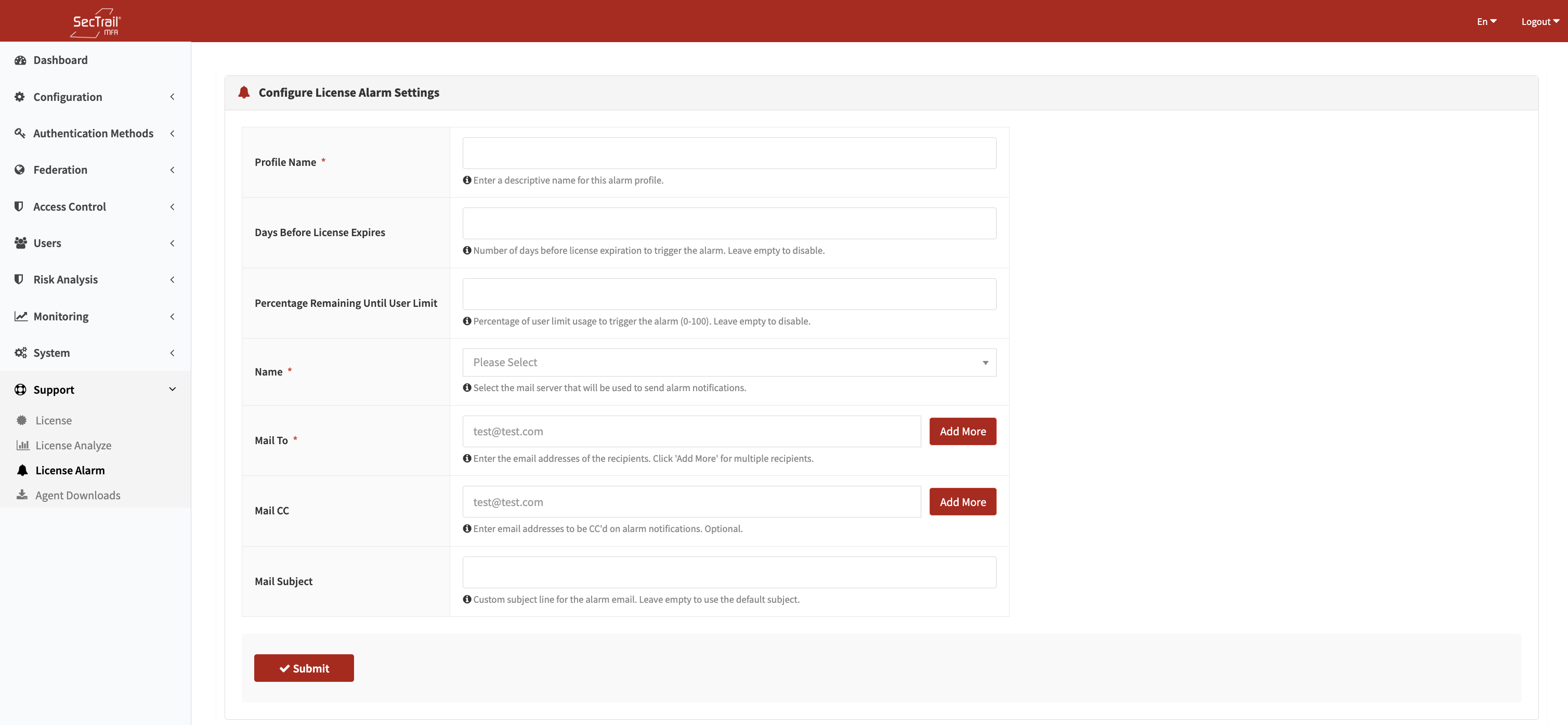
License alarm configuration
Alarm Types
1. Days Until License End:
Receive notifications based on how many days remain until your license expires.
Configuration:
Threshold: 30 days Result: Alarm triggers 30 days before license end date
Recommended Threshold Values:
- 60 days: Early warning, start renewal process
- 30 days: Standard warning, request renewal
- 15 days: Critical warning, urgent renewal needed
- 7 days: Final warning, risk of service interruption
2. License User Limit Percentage:
Receive notifications when you reach a certain percentage of your user limit.
Configuration:
Threshold: 85% usage
Result: Alarm triggers when usage reaches 85%

Example:
- Limit: 200 users
- 85%: 170 users
- Current: 168 users → NO alarm
- Current: 171 users → ALARM TRIGGERED
- Email: "User limit reached 85.5% (171/200)"
Recommended Threshold Values:
- 75%: Early warning, plan capacity
- 85%: Standard warning, evaluate limit increase
- 90%: Critical warning, urgent limit increase needed
- 95%: Final warning, new users will soon be blocked
Multiple Alarm Example
You can set up alarms for both expiration date and user limit:
How It Works
The system automatically checks license status daily. When the license end date or user count reaches the configured threshold value, it sends an email notification to the specified recipients.
Contact
24/7 Support
📧 Email: support@sectrail.com 📞 Phone: +90 850 222 0268
License Request
To obtain a new license or renew your existing license:
- Copy your App Key and Dossier information from the License page
- Send this information to the support team
- Enter the License Key you receive in the system
Related Pages
- Dashboard: License summary information
- System: Backup and system management
- Monitoring: User activity logs
- Users: Active user management