OpenShift
SecTrail CM establishes agent-less connections to OpenShift / Kubernetes clusters to automatically discover, deploy, and remove certificates and keystores held in ConfigMaps and Secrets.
SecTrail CM can discover and monitor PEM certificates, TLS certificate pairs, and Java keystores in the ConfigMaps and Secrets of a namespace, add certificates from its inventory to these resources, and remove them when needed.
Connection Requirements
| Requirement | Detail | Description |
|---|---|---|
| Protocol | Kubernetes API (HTTPS) | The OpenShift / Kubernetes API server is used |
| Endpoint | https://api.<cluster>.<domain>:<port> | The cluster's API server address |
| Authentication | Service Account Token or Kubeconfig | Authentication with a short-lived token or a kubeconfig file |
| Permission | RBAC permissions in the namespace | Reading and updating ConfigMaps/Secrets, restarting Deployments |
Automated Operations
SecTrail CM automatically performs the following operations on OpenShift:
- Certificate Discovery: Listing the certificates and keystores in the ConfigMaps and Secrets of the namespace
- Certificate Add: Adding certificates from the SecTrail inventory to a ConfigMap or Secret
- Certificate Remove: Removing existing certificates from a ConfigMap or Secret
- Deployment Restart: Restarting the Deployments that use the changed resource (optional)
- Backup & Rollback: Backing up the resource before the change and restoring it on failure
Configuration Steps
1. Requirements on the OpenShift Side
1. Service account and permissions
A service account (clm-cert-updater) must be created in the namespaces to be managed and given the following permissions:
configmaps,secrets→get,list,patchdeployments→get,list,patch(to restart the related pods when a certificate changes)
2. Fixed token
A long-lived token is given to SecTrail CM. This token does not read any data directly; on every run, it is used to mint a temporary token valid for 10 minutes. For this, a separate account (clm-token-issuer) is created and given permission only to mint tokens on behalf of clm-cert-updater.
3. API access
- API address:
https://api.<cluster>.<domain>:<port> - Access from the SecTrail CM server to this address must be allowed.
2. Creating an OpenShift User
Go to Automation > Device Users and create a user for OpenShift:
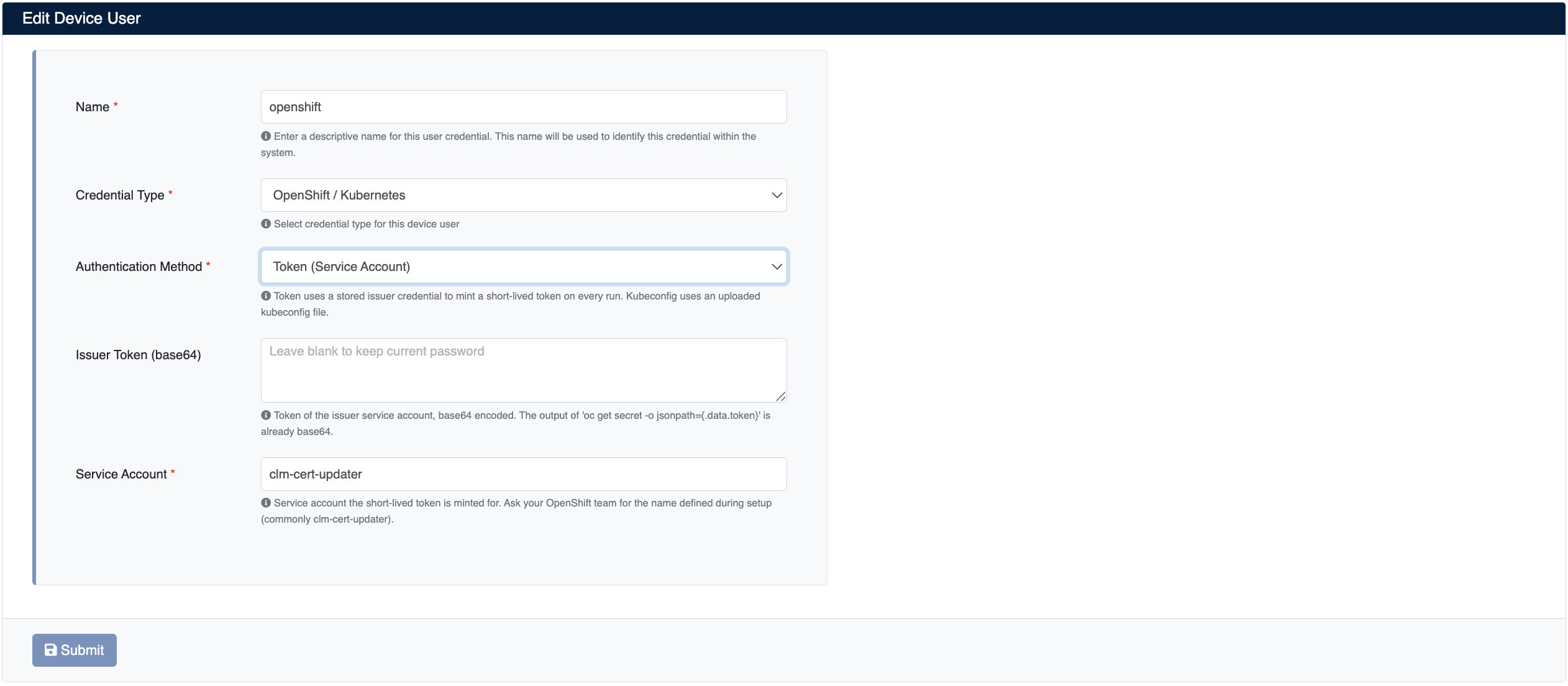
- Name: Give the user a descriptive name
- Credential Type: Select
OpenShift / Kubernetes - Authentication Method: Select the authentication method:
- Token (Service Account): The recommended method. A short-lived token is minted on every run using the stored issuer token.
- Kubeconfig File: A kubeconfig file is uploaded to reach the cluster. The file is stored privately on the server.
- Issuer Token (base64): The fixed token created for
clm-token-issueron the OpenShift side (for the Token method) - Service Account: The service account the short-lived token is minted for (e.g.,
clm-cert-updater)
Click Submit to save the user.
With the Kubeconfig method, the identity in the kubeconfig file must have the same permissions as the clm-cert-updater service account.
3. Adding the OpenShift Device to SecTrail CM
Click Automation > Devices > Add New Device and enter the following information:
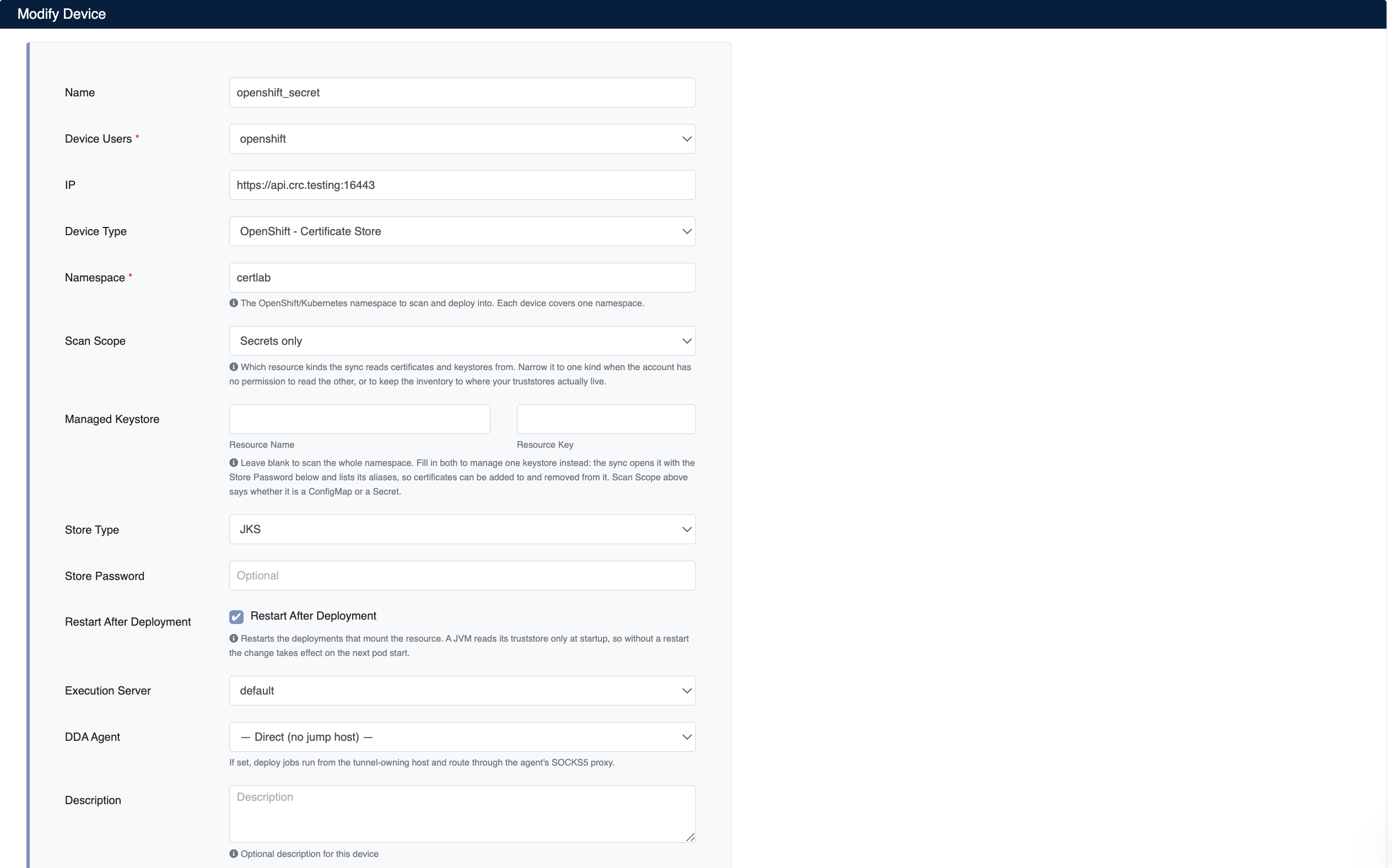
- Name: Give the device a descriptive name (e.g.,
openshift_secret) - Device Users: Select the user you created in Step 2
- IP: The cluster's API server address (
https://api.<cluster>.<domain>:<port>, e.g.,https://api.crc.testing:16443) - Device Type: Select
OpenShift - Certificate Storefrom the drop-down menu - Namespace (required): The namespace to scan and add certificates to. Each device covers one namespace.
- Scan Scope: Which resources certificates are read from:
ConfigMaps and Secrets,ConfigMaps only, orSecrets only - Managed Keystore (optional): Leave blank to scan the whole namespace. To manage a single keystore, fill in Resource Name (the ConfigMap/Secret name) and Resource Key (the key holding the keystore, e.g.,
truststore.jks). Whether the resource is a ConfigMap or a Secret is determined by the Scan Scope field. - Store Type: The keystore type (
JKS,PKCS12,BKS,BCFKS,UBER) - Store Password: The keystore password
- Restart After Deployment: If checked, the Deployments that mount the changed resource are restarted after the operation. Because Java applications read their truststore only at startup, without a restart the change takes effect on the next pod start.
- Execution Server: The server to be used for executing deployment operations (e.g.,
default)
Click Submit to save the device.
After the OpenShift device is added to SecTrail CM, the certificates in the namespace are automatically included in the discovery cycle and scanned regularly. Alarms are automatically created for certificates that are about to expire or have problems.
4. Viewing Device Information
After the device is added, it will appear in the Automation > Devices list. Click the row to view the device details:
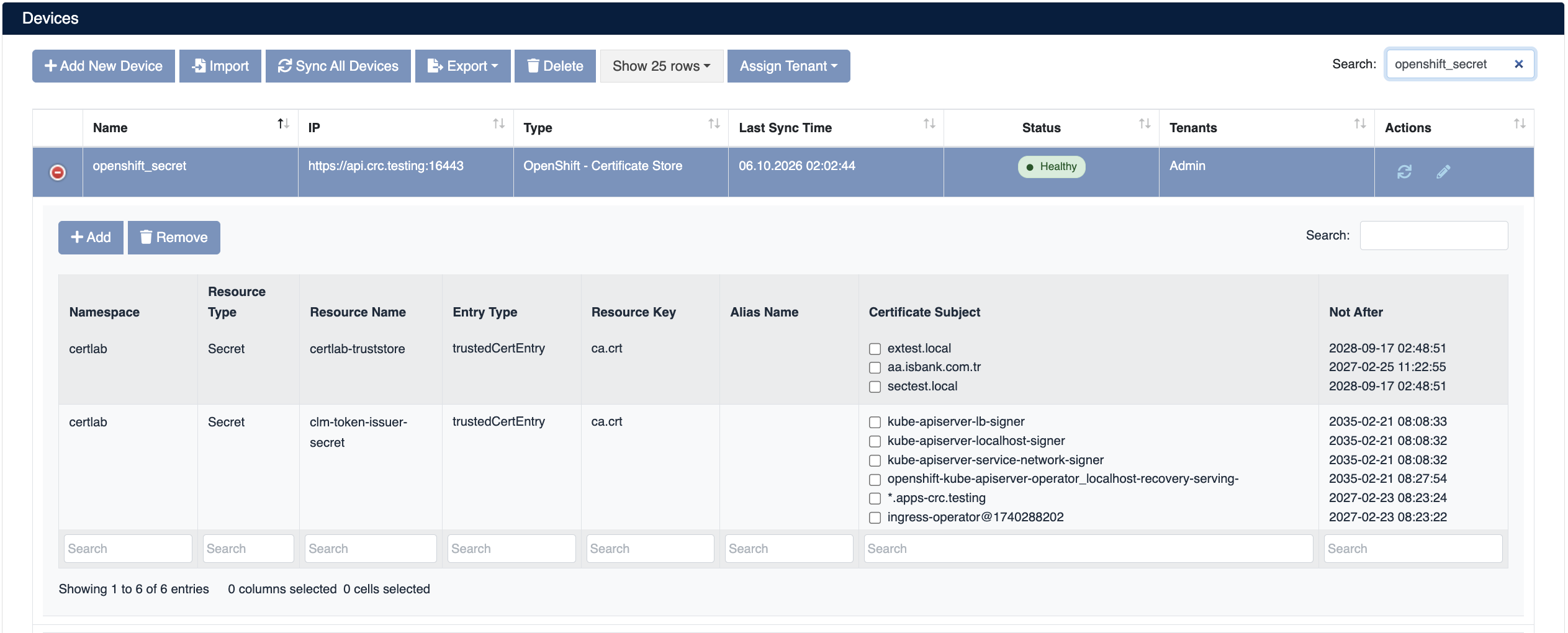
The following information is shown in the device details:
- Namespace: The namespace the resource is in
- Resource Type: The resource type (
ConfigMaporSecret) - Resource Name: The ConfigMap or Secret name
- Entry Type: The entry type (
trustedCertEntryorPrivateKeyEntry) - Resource Key: The key holding the certificate or keystore (e.g.,
ca.crt,truststore.jks) - Alias Name: The alias name in the keystore
- Certificate Subject: The certificates in the resource. If a PEM bundle holds more than one certificate, each is listed separately.
- Not After: The certificate's expiration date
Certificate Deployment (Add)
Step 1: Selecting the Target and Certificate
- Select your OpenShift device under Automation > Devices
- Click the Add button in the device details
- Fill in the Add Trust Store form that opens:
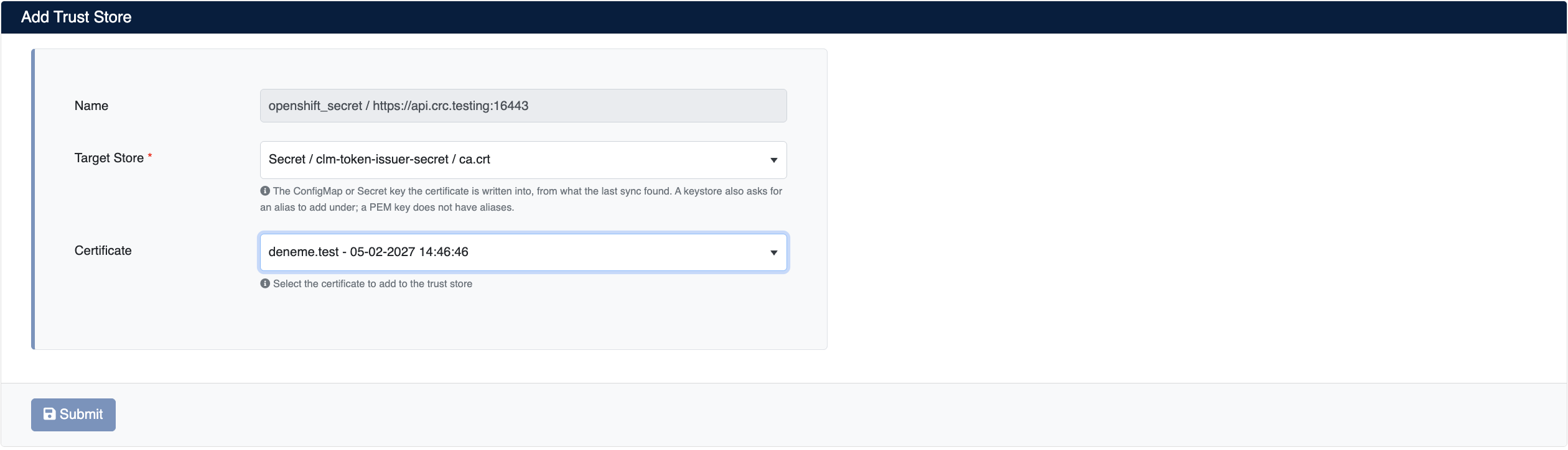
- Target Store (required): The ConfigMap/Secret key the certificate is written into. The resources found in the last sync are listed; for a resource that is not in the list, the Another resource (enter manually) option can be used.
- Alias Name: If the target is a keystore, the alias under which the certificate is added. PEM keys have no aliases, so this field is not shown for them.
- Certificate: The certificate to add
- PEM key (e.g.,
ca.crt): The certificate is appended to the end of the existing bundle. The private key is not added. If the certificate is already in the bundle, it is not added again. - Keystore (e.g.,
truststore.jks): A certificate without a private key is added as atrustedCertEntry; a certificate with a private key is added as aPrivateKeyEntry.
Step 2: Starting the Deployment
Click the Submit button to start the certificate deployment.
Step 3: Tracking the Operation
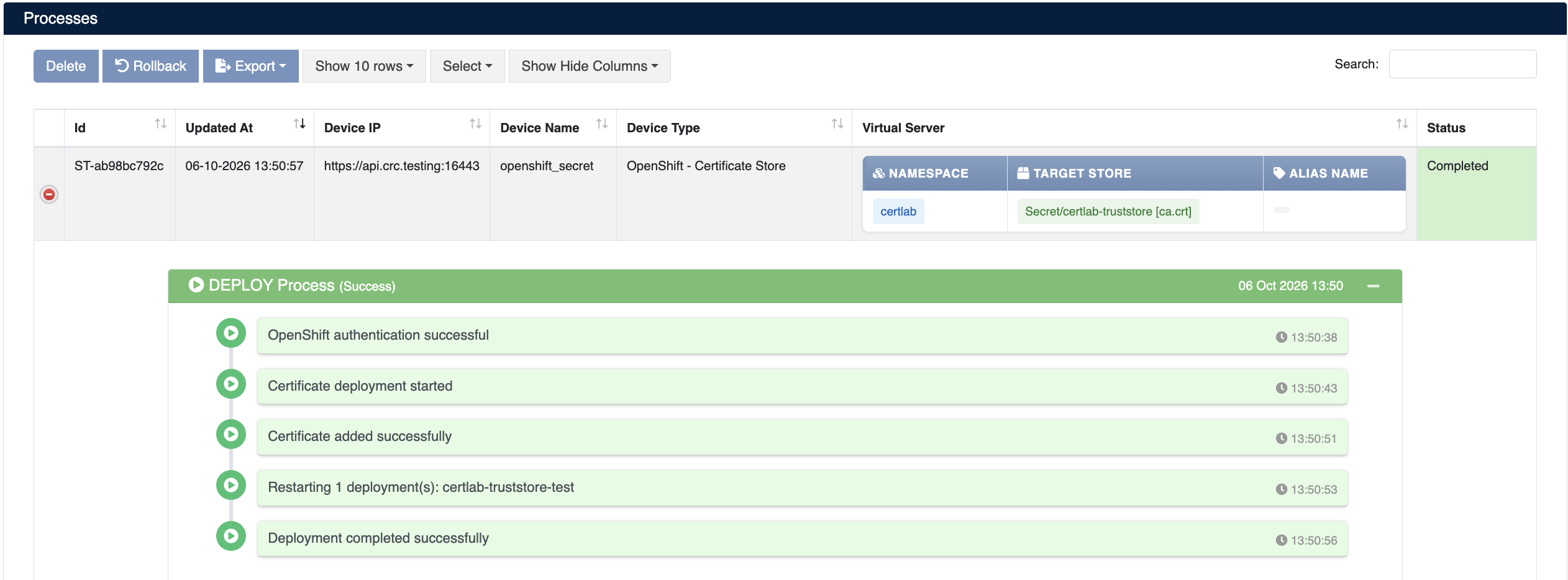
The deployment can be tracked under Automation > Processes:
Operation Details
The following steps are performed during deployment:
| Step | Operation Description |
|---|---|
| 1 | OpenShift authentication is performed (OpenShift authentication successful) |
| 2 | The target resource is backed up and the deployment starts (Certificate deployment started) |
| 3 | The certificate is added to the ConfigMap/Secret (Certificate added successfully) |
| 4 | If Restart After Deployment is on, the Deployments using the resource are restarted (Restarting 1 deployment(s): <deployment>) |
| 5 | The operation completes (Deployment completed successfully) |
If a step fails, the changed ConfigMap/Secret is restored from the backup taken before the operation.
Certificate Removal (Remove)
SecTrail CM supports removing certificates from ConfigMaps and Secrets.
Removal Steps
- Select your OpenShift device under Automation > Devices
- Check the certificates you want to remove in the Certificate Subject column
- Click the Remove button and confirm to start the removal
Removal Task Details
The removal can be tracked under Automation > Processes:
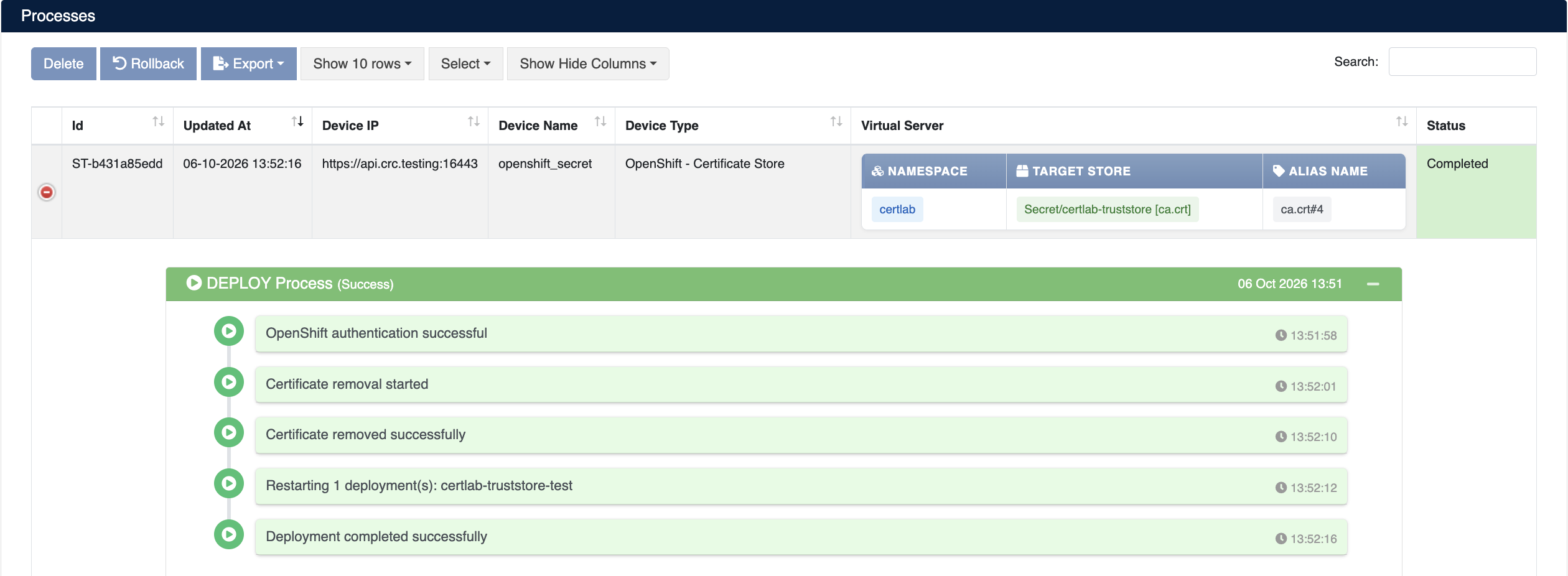
| Step | Operation Description |
|---|---|
| 1 | OpenShift authentication is performed (OpenShift authentication successful) |
| 2 | The target resource is backed up and the removal starts (Certificate removal started) |
| 3 | The certificate is removed from the ConfigMap/Secret (Certificate removed successfully) |
| 4 | If Restart After Deployment is on, the Deployments using the resource are restarted (Restarting 1 deployment(s): <deployment>) |
| 5 | The operation completes (Deployment completed successfully) |