Approved OTP
Approved OTP is a hierarchical authentication method where users must receive approval from a manager or sponsor before logging in. It provides an additional layer of control for critical access scenarios.
What is Approved OTP?
Approved OTP profiles operate in two modes:
- Manager Information: When the user logs in, an informational email/SMS is sent to their manager.
- Approved Authentication: The user must receive explicit approval from their manager to complete the login.
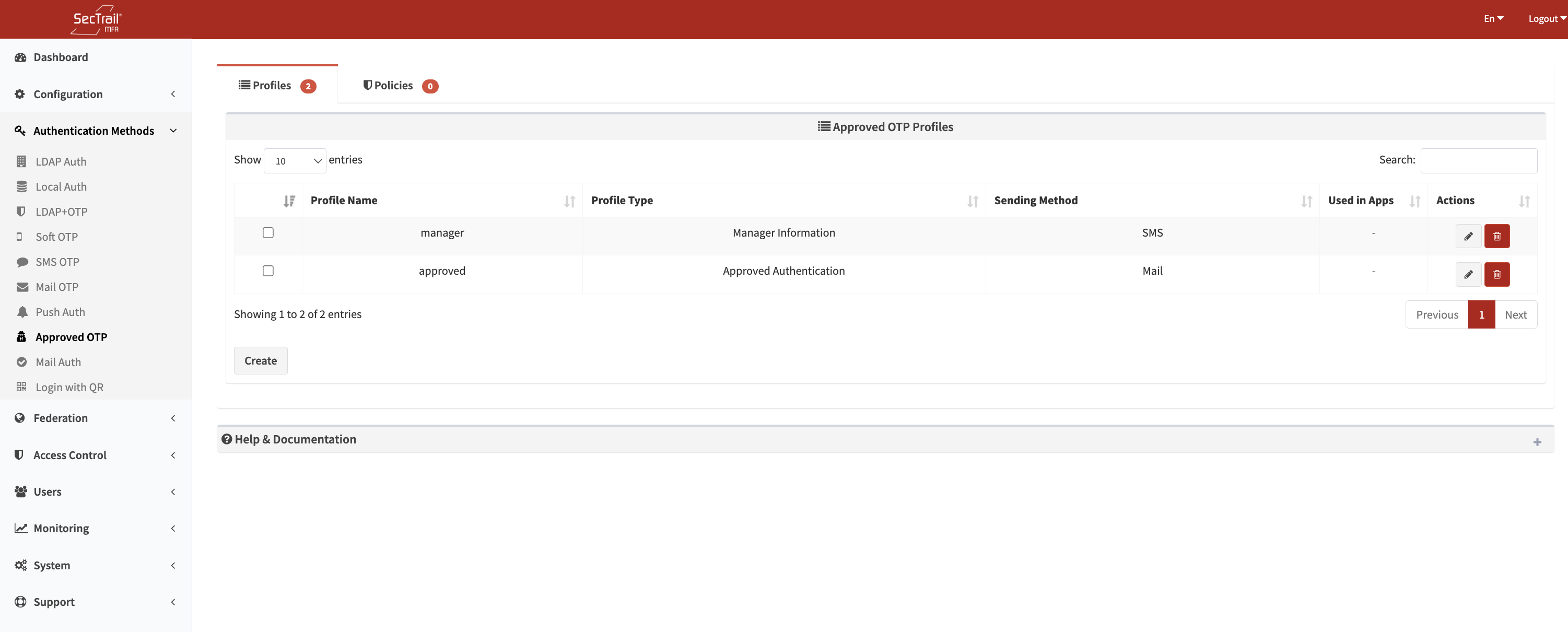
Approved OTP Authentication Method
Profile Types
1. Manager Information
When the user logs in, the system automatically sends an informational message to the manager.
The user does not wait and can access the system immediately.
Use Cases:
- Auditing and record-keeping
- Keeping managers informed about user activities
- Post-event intervention for suspicious access
2. Approved Authentication
The user must wait for their manager’s approval to proceed. The manager approves or rejects the request via a link sent to them.
Use Cases:
- Critical system access
- Sensitive data access
- High-privilege accounts
- External partner access
Profiles
Approved OTP profiles define how the approval process will work.
Profile Configuration Fields
- Profile Name: A descriptive name for the profile
- Type: Manager Information or Approved Authentication
- Server: SecTrail MFA server URL (used in approval links)
- Message: Text sent to the manager
- Link Expiration Time: Validity period of the approval link (in minutes)
- Delivery Method: Email or SMS
- Profile Selection: Mail or SMS profile selection
- Email Subject: Subject line used in email delivery
- Default Recipient: Default email or phone used when manager info is not found
- Fallback Authentication Profiles: LDAP/Local profiles used to authenticate the user
- Authentication Methods: Which authentication methods can be used with this profile
How Is Manager Information Retrieved?
For LDAP Users:
- Manager attribute must be configured in LDAP
- Example:
managerattribute should contain the manager's DN
For Local Users: The following sponsor information must be defined for local users:
- Sponsor Name
- Sponsor Email
- Sponsor Phone
If manager information cannot be found for the user, the Default Recipient defined in the profile will be used.
Type Comparison
| Feature | Manager Information | Approved Authentication |
|---|---|---|
| Purpose | Inform managers | Require manager approval |
| Does User Wait? | No | Yes |
| Is Login Blocked? | No | Yes (until approval) |
| Link Interaction | Optional | Required |
| Use Case | Auditing, monitoring | Critical access |
| Security Level | Medium | High |
| User Experience | Smooth | Slower (waiting) |
Policies
Approved OTP policies determine which users are authenticated using which profile.
Policy Configuration Fields
- Approved OTP Profile: The approved OTP profile to use
- Fallback Authentication Profile: LDAP/Local profile used to fetch user attributes
- This profile must be one of the approved OTP profile's fallback authentication profiles
- Attribute: User attribute
- LDAP/Local attributes can be used
- Attribute Value: Value(s) to match
Policy Behavior
- If No Policy Exists: All users are directed to the default profile
- If Policies Exist: Only users matching a policy rule can authenticate
- Priority Order: Policies are evaluated top to bottom; the first match is used
User Authentication Flow
Manager Information Mode
- User logs in
- System sends informational message to manager
- User accesses the system directly
- Manager receives the informational message (for information purposes only)
Approved Authentication Mode
- User logs in
- System sends message with approval link to manager
- User sees "Waiting for manager approval" message
- Manager clicks the link to approve or reject
- If approved, user accesses the system; if rejected, login is blocked
Use Cases
Scenario 1: Critical System Access
Manager approval required for database server or production environment access.
Scenario 2: External Partner Management
Manager-controlled access for customer or vendor logins.
Scenario 3: Audit Monitoring
Keeping managers informed of user login activities.
Setup Steps
- Prepare Manager Information: Configure LDAP manager attribute or sponsor information for local users
- Mail/SMS Service Setup: Create mail or SMS profile for sending notifications
- Prepare Fallback Authentication Profile: Create LDAP or Local authentication profile
- Create Approved OTP Profile: Select profile type (information/approval) and configure settings
- Create Policy: Determine which users will use this profile
- Test: Test the approval process with a test user
- Application Integration: Add the profile to application profiles
Advantages
- ✅ Additional Control Layer: Manager approval for critical access
- ✅ Audit Monitoring: Record of all access attempts
- ✅ Flexibility: Option for information or approval mode
- ✅ Compliance: Meets regulatory requirements
- ✅ Suspicious Access Prevention: Enhanced security with manager control
Considerations
- Approval process slows down user experience—use only where necessary
- Ensure manager email/SMS information is up to date
- Set link expiration time to a reasonable value (e.g., 60 minutes)
- Always define a default recipient (used when manager info is not found)