IP Reputation Sources
IP Reputation Sources tell the Risk Engine which IP addresses are known to be malicious, suspicious, or associated with anonymization services (VPNs, Tor, proxies). When a user logs in from a flagged IP, the known_bad_ip, suspicious_ip_reputation, or ip_blocklist signals are triggered and contribute to the risk score.
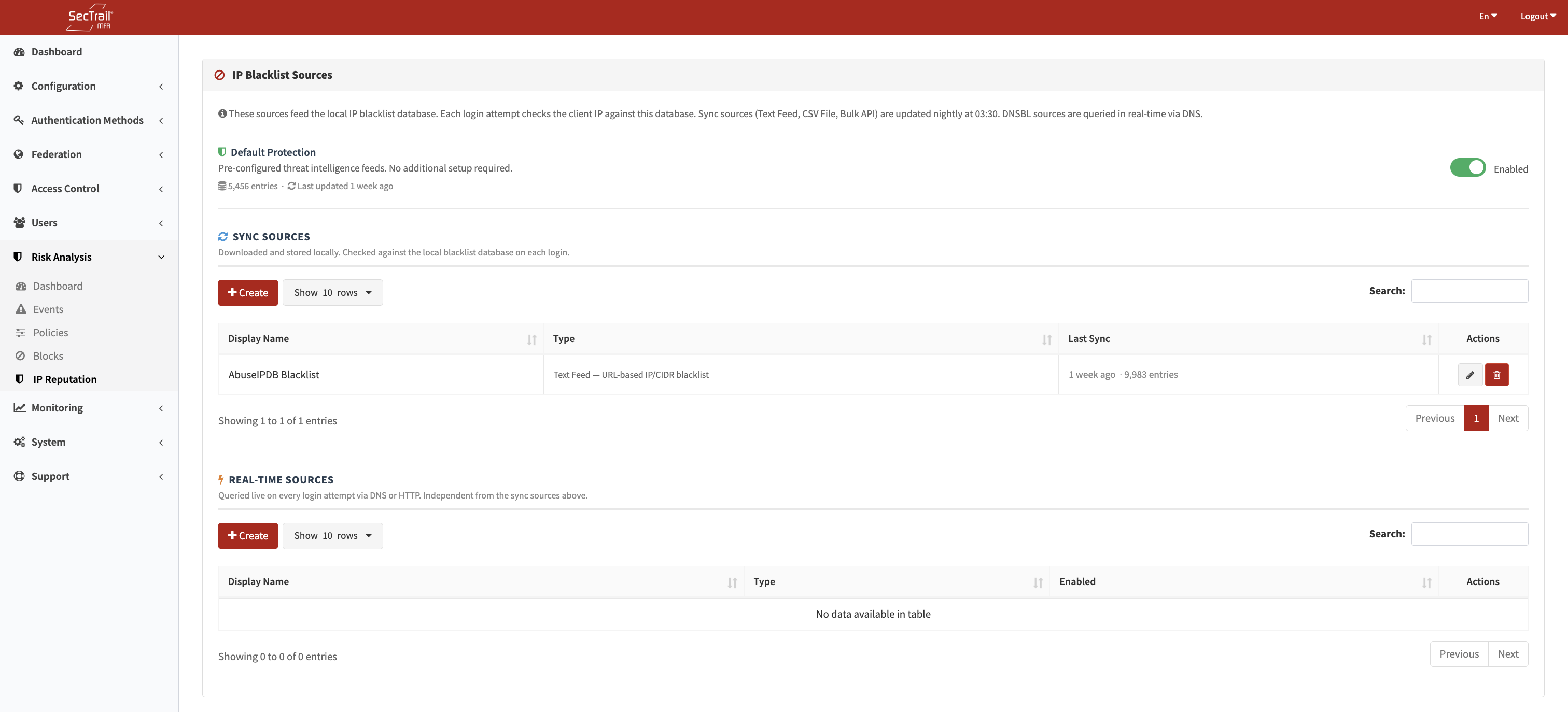
IP Reputation Sources — Built-in and custom source configuration
Sources fall into two categories based on how they work:
| Category | How It Works |
|---|---|
| Sync Sources | Fetch IP lists on a schedule and store them locally for fast lookup at login time |
| Real-time Sources | Queried live on every login attempt; no local storage |
Built-in Sources
Built-in sources are enabled by default. They cannot be deleted but can be disabled. If you want to use a different source, you can add custom sources through the interface.
When access to the relevant source is provided, it updates automatically at regular intervals. For details about access, contact our team. If access is not available, list updates are delivered through patch releases published by our team.
Custom Sync Sources
Custom sync sources fetch IP lists and import them into the local ip_reputation table. They are best for large static or periodically updated blocklists.
Text Feed (text_feed)
Fetches a plaintext file from a URL and parses IP addresses from it.
| Field | Description |
|---|---|
| URL | The HTTP/HTTPS URL of the feed |
| Format | ip_tsv — Tab-separated values with IP in first column; cidr — CIDR notation (e.g., 192.168.1.0/24) |
| Score Weight | Integer 1–100; higher values contribute more to the risk score when this source flags an IP |
| Source Identifier | A unique string label for this source (used in event details and log entries) |
CSV / Text File Upload (csv_file)
Upload a local TXT or CSV file (maximum 50 MB) containing IP addresses.
| Field | Description |
|---|---|
| File | TXT or CSV file upload |
| Format | plain — One IP per line; ip_tsv — Tab-separated; cidr — CIDR ranges |
| Score Weight | Integer 1–100 |
| Source Identifier | Unique label for this source |
Bulk API (bulk_api)
Calls an HTTP API endpoint that returns a JSON list of IP addresses. The entire list is fetched and imported locally.
| Field | Description |
|---|---|
| Endpoint URL | Full URL of the API endpoint |
| HTTP Method | GET or POST |
| JSON List Path | JSONPath expression pointing to the array of IP objects (e.g., data.ips) |
| IP Field Name | Key within each object that contains the IP address |
| Score Field Name | Key within each object that contains a dynamic score (optional) |
| High Threshold | If the dynamic score is above this value, treat as high risk |
| Low Threshold | If the dynamic score is below this value, treat as low risk |
| Fixed Score | A static score to assign when no dynamic score is available |
| Timeout (seconds) | Maximum time to wait for the API response |
Custom Real-time Sources
Real-time sources query an external service on every login attempt. They add latency to the login flow, so use them only when freshness is critical.
DNSBL (dnsbl)
Uses DNS-based blocklists (DNSBL) to look up the client IP. The IP is reversed and prepended to the DNSBL zone as a DNS query.
| Field | Description |
|---|---|
| DNSBL Zone | The DNS zone to query (e.g., zen.spamhaus.org, bl.spamcop.net) |
| Source Identifier | Unique label for this source |
Example: For IP 1.2.3.4 querying zone zen.spamhaus.org, the DNS lookup is 4.3.2.1.zen.spamhaus.org. A non-NXDOMAIN response means the IP is listed.
HTTP API (http_api)
Calls a custom HTTP endpoint for each login IP and parses a risk score from the JSON response.
| Field | Description |
|---|---|
| Endpoint URL | Full URL; use {ip} as a placeholder for the client IP |
| HTTP Method | GET or POST |
| Custom Headers | One Key: Value pair per line |
| Query Parameters | Additional URL parameters |
| Body Template | Request body (for POST); use {ip} as a placeholder |
| JSON Score Path | JSONPath expression to the score field in the response |
| High Threshold | Score values above this are treated as high risk |
| Low Threshold | Score values below this are treated as low risk |
| Timeout (seconds) | Maximum time to wait for each per-login API call |
How Lookup Works
At login time, the IpReputationManager queries all enabled sources:
- Sync sources are looked up against the local
ip_reputationtable (integer range scan — no DNS or HTTP calls). - Real-time sources are called live.
- The single highest-scoring hit across all sources is returned and passed to the Risk Engine.
The result carries the source identifier, score, and display name shown in event details.
Deleting a Custom Sync Source
When a custom sync source is deleted, all IP records imported from that source are also removed from the ip_reputation table. If it was the last sync source, built-in sources are automatically re-enabled.
Setup Steps
- Go to Risk Analysis → IP Reputation Sources
- To use built-in protection, ensure the Enable built-in protection toggle is on (default)
- To add a custom source:
- Click Add Source
- Choose Sync or Real-time
- Select the driver type and fill in the required fields
- Save
- For sync sources, trigger an initial sync or wait for the scheduled sync to run
- Verify the imported IP count in the source list