Risk Events
The Risk Events page provides a full audit log of every login attempt evaluated by the Risk Engine. Each event captures the risk score, triggered signals, device information, geographic data, and anomaly flags. Admins can browse, filter, and investigate individual events in detail.
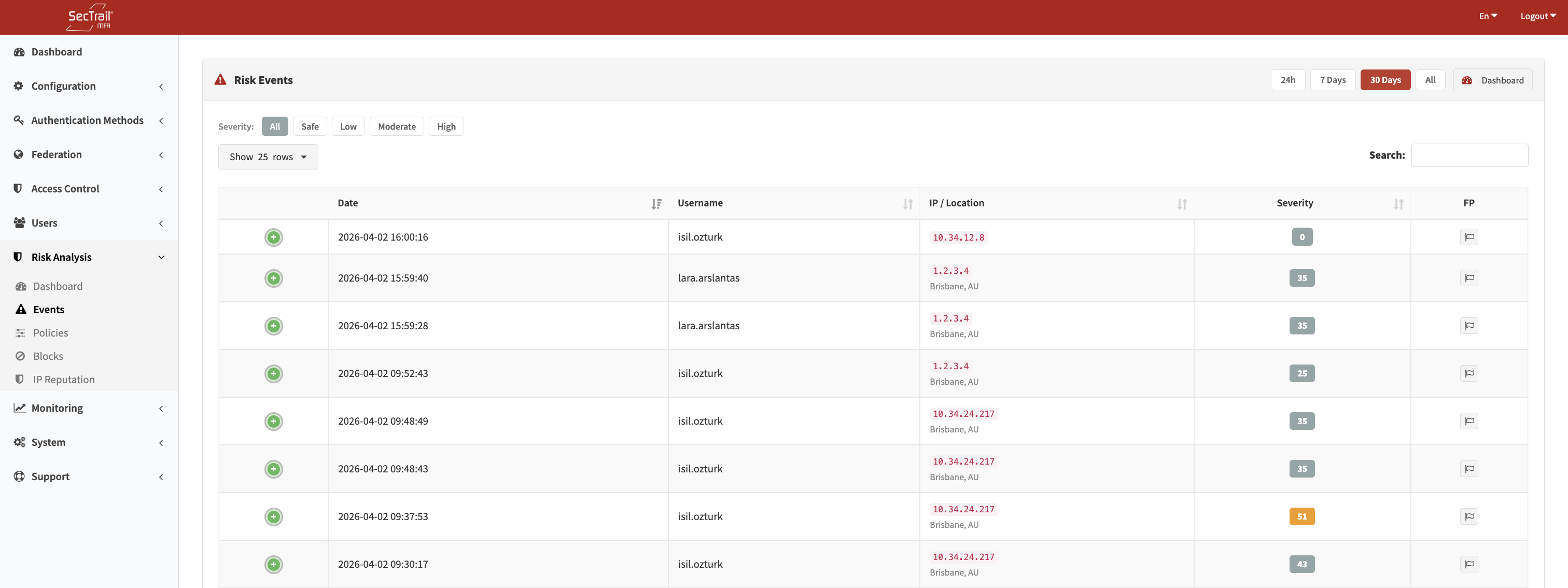
Risk Events — Login evaluations, risk scores, and signal details
Filters
Time Range
| Option | Description |
|---|---|
| Last 24 Hours | Events from the past 24 hours |
| Last 7 Days | Events from the past 7 days |
| Last 30 Days | Events from the past 30 days |
| All | Full event history |
Severity Filter
Quick-filter buttons for All / Safe / Low / Moderate / High severity bands. Multiple selections are not supported; each button is mutually exclusive.
Search
Full-text search across username, IP address, city, and country fields.
Event List Columns
| Column | Description |
|---|---|
| Date / Time | When the login attempt occurred |
| Username | The user identifier |
| IP Address | Resolved client IP, with country flag |
| City / Country | Geographic location from IP geo database |
| Risk Score | Numeric score with severity badge (color-coded) |
| Signals | Tags showing each triggered signal with its MITRE ATT&CK technique ID. Hovering over a tag shows the signal description |
| Device | Browser name, OS name, device type |
| ASN | Autonomous System Number and AS name |
False-Positive Rows
Events marked as false positives are visually dimmed (60% opacity) and their severity badge is greyed out. This allows admins to distinguish confirmed benign events from active threats without deleting the record.
Event Detail
Clicking on an event row opens a detail panel (loaded via AJAX) with the complete event record:
Identity & Location
- Username, IP address, country, region, city
- Latitude and longitude
- ASN and AS name
Device Information
- Browser name and version
- Operating system name and version
- Device type (desktop, mobile, tablet, etc.)
- Raw user-agent string
- Device fingerprint hash
- Bot detection flag
Timezone Analysis
- Browser Timezone — Timezone reported by the browser (UTC offset in minutes)
- IP Timezone — IANA timezone name resolved from the IP geo database
- Timezone Difference — Computed difference between the two (hours). A large mismatch can indicate VPN or proxy use.
Travel Analysis
- Impossible Travel — Boolean flag indicating whether the login location is physically impossible given the time elapsed since the previous login
- Travel Velocity — Computed speed in km/h between the current and previous login location
Triggered Signals
A breakdown of all signals that fired, grouped by context category (Reputation, Location, Identity, Time, Device). Each signal shows its key name, MITRE ATT&CK technique ID, and the score it contributed.
Normal Profile (for comparison)
Built from the user's last 100 low-risk (Safe) events:
- Most common countries
- Most common cities
- Most common browsers
- Most common operating systems
- Most active hours (histogram)
This profile helps distinguish genuine anomalies from expected variation in the user's behavior.
False-Positive Toggle
Admins can mark any event as a false positive directly from the detail panel. Marking an event as a false positive does not lift any blocks — it only changes the visual presentation and allows filtering.
Risk Signal Reference
The following signals may appear on events. They are grouped by context and mapped to MITRE ATT&CK techniques:
Reputation Signals (T1090)
| Signal | Description |
|---|---|
known_bad_ip | IP matched a high-confidence threat feed |
suspicious_ip_reputation | IP matched a medium-confidence threat feed |
ip_blocklist | IP is on an active IP blocklist |
Location Signals
| Signal | MITRE | Description |
|---|---|---|
impossible_travel | T1078 | Location change is physically impossible given elapsed time |
geo_radius_exceeded | T1078 | Login is outside the user's normal geographic radius |
new_country | T1078 | Login from a country not seen in user history |
new_region | T1078 | Login from a region not seen in user history |
new_city | T1078 | Login from a city not seen in user history |
datacenter_asn | T1583.003 | IP belongs to a known cloud/datacenter ASN |
known_vpn_asn | T1090.003 | IP belongs to a known VPN provider ASN |
tor_anonymous_proxy_asn | T1090.003 | IP belongs to a Tor exit node ASN |
Identity Signals (T1110 / T1078)
| Signal | Description |
|---|---|
failed_attempts | Multiple recent authentication failures for this user |
first_time_login | This is the user's first successful login ever |
dormant_account | Account has been inactive for an extended period |
novel_asn | Login from an ASN not seen in recent user history |
Time Signals (T1078)
| Signal | Description |
|---|---|
unusual_hour | Login hour falls outside the user's historical active hours |
nighttime_login | Login occurred during typical nighttime hours |
weekend_login | Login occurred on a weekend |
timezone_mismatch | Browser-reported timezone differs significantly from IP-derived timezone |
Device Signals (T1059 / T1078)
| Signal | Description |
|---|---|
bot_detected | User-agent or behavior matches known bot patterns |
headless_browser | Browser fingerprint indicates a headless/automated browser |
empty_user_agent | No user-agent string present |
new_device | Device fingerprint not seen in recent user history |
new_device_no_cookie | No device cookie present and fingerprint is new |
fingerprint_blocklist | Device fingerprint is on the blocklist |
fingerprint_watchlist | Device fingerprint is on the watchlist |
shared_device | Same device fingerprint recently used by multiple users |
browser_name_changed | Browser name differs from recent logins |
os_name_changed | Operating system differs from recent logins |
device_type_changed | Device type (desktop/mobile) differs from recent logins |