CMP Server
SecTrail CM includes a built-in CMP Server (Certificate Management Protocol - RFC 4210, with HTTP transport per RFC 6712). CMP is a comprehensive certificate management protocol used especially in industrial automation (OT), telecom infrastructure (5G/LTE base stations), IoT devices, and embedded systems.
Devices with CMP support can obtain certificates directly from SecTrail CM, without requiring any additional agent to be installed on them. Certificates are issued by the CAs managed by SecTrail CM (Local CA, Microsoft ADCS, DigiCert, etc.) according to the template rules you define.
- CMP Server: Messages protect themselves; authentication is performed with a shared secret (PasswordBasedMac) or a signature from a certificate the device already holds. Common in industrial and telecom devices.
- EST Server: Runs over HTTPS and authenticates with HTTP Basic or mTLS.
- SCEP Server: The protocol with the broadest device support; authenticates with a challenge password.
Benefits
- Industry standard: Compliant with RFC 4210 / RFC 6712; works with standard clients such as OpenSSL
cmpand with CMP-capable devices - Flexible authentication: A shared secret (PBM), a certificate signature, or either can be accepted
- Message-level protection: Every request and response is protected with a MAC or a signature
- Manual approval support: Optionally, enrollment requests are held until an authorized person approves them; this integrates with the approval workflow and email notifications
- Full visibility: All enrollment operations and issued certificates are recorded and added to the inventory
How It Works
The core components of the CMP Server are:
| Component | Description |
|---|---|
| Profile | Defines a CMP endpoint. It determines which template certificates will be issued with, the client authentication method, and the approval settings. |
| Transaction | The record of each enrollment operation performed by devices. |
The flow proceeds as follows:
- The administrator creates a CMP Profile, binds it to a certificate template, and selects the authentication method.
- The device sends its certificate request (
ir,cr, orp10cr), protected with a MAC derived from the shared secret or with a signature from its own certificate. - If authentication succeeds, the certificate is issued according to the template rules, added to the inventory, and returned to the device.
- The device acknowledges the received certificate with a
certConfmessage; the server closes the exchange withpkiConf. - If manual approval is enabled on the profile, the request is held as pending; the device polls periodically with
pollReqand receives its certificate once it is approved.
A CMP profile can issue certificates only against the template it is bound to. The template determines which CA is used, the validity period, and other certificate parameters. For template management, see Inventory → Issue Certificate → Templates.
CMP Endpoint
Each profile gets its own endpoint based on its Label value. CMP uses a single URL; the client sends a binary PKIMessage with POST (Content-Type: application/pkixcmp), and the operation is determined by the message body type:
| Endpoint | Description |
|---|---|
/cmp/{label} | The URL all CMP messages are sent to |
| Message | Description |
|---|---|
ir | Initialization Request - initial certificate enrollment |
cr | Certification Request - an additional/new certificate request using a certificate the device already holds |
p10cr | Certificate request with a PKCS#10 CSR |
certConf | The client's confirmation of the certificate it received |
pollReq | Polls the status of a request awaiting approval |
The endpoint of an inactive profile or an undefined label returns 404. Unprotected messages (without a MAC or signature) are rejected. Errors at the CMP level are returned with HTTP 200, inside an error message.
CMP Profiles
Creating a CMP Profile
Go to Certificate Authorities (CA) > CMP Server > CMP Profiles and click the Create button:
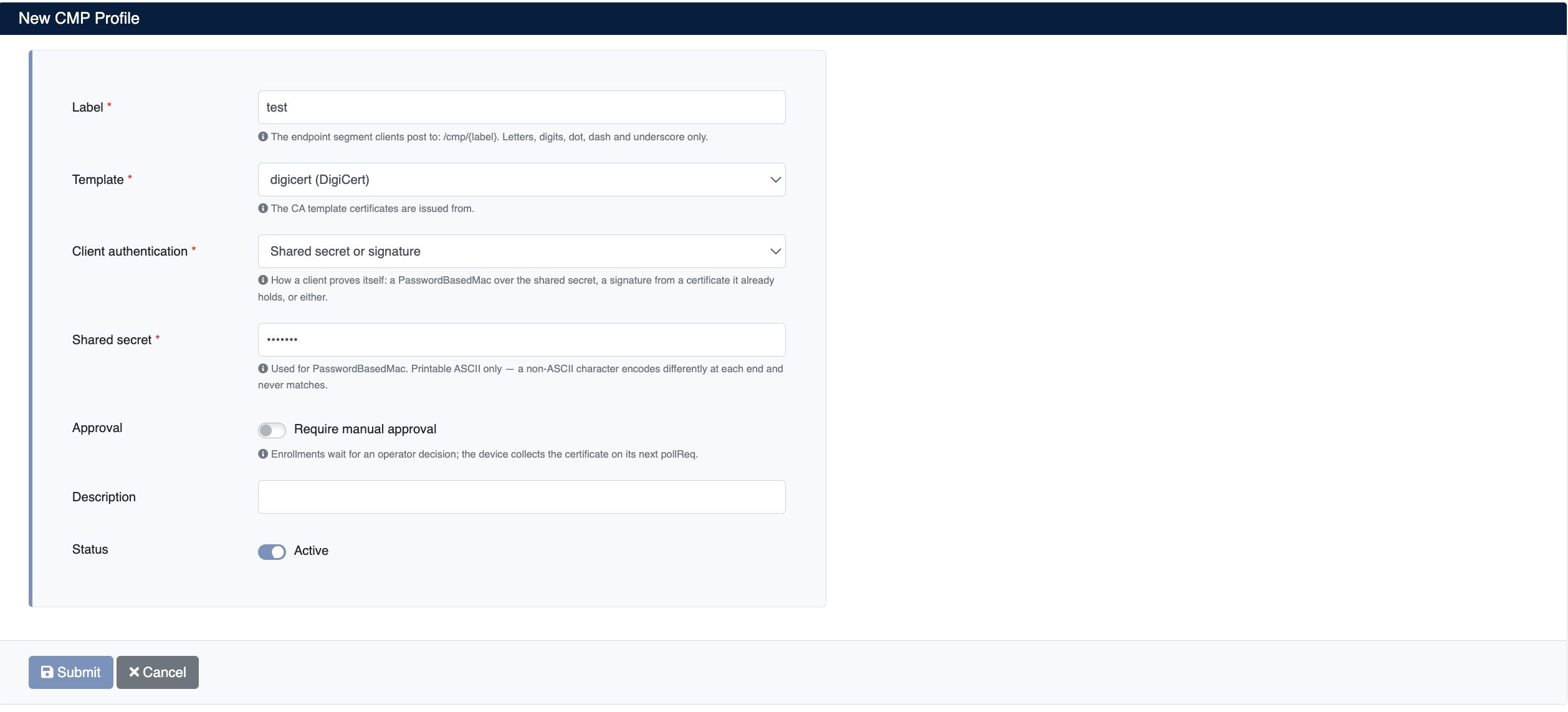
Enter the following information:
- Label (required): The URL path segment of the profile (e.g.,
devices). The endpoint clients post to takes the form/cmp/{label}. Only letters, digits, dot, hyphen, and underscore are allowed, and it must be unique across all tenants. - Template (required): The template of the certificates to be issued through this profile. It determines the CA that signs the certificate, the validity period, and the profile details.
- Client authentication (required): How the client proves its identity:
- Shared secret (PBM): The client protects the message with a PasswordBasedMac derived from the shared secret.
- Certificate signature: The client signs the message with a certificate it already holds. The signer certificate must have been issued by the CA bound to the profile's template.
- Shared secret or signature: Either method is accepted.
- Shared secret (required when PBM is used): The shared secret used for PasswordBasedMac. Only printable ASCII characters are allowed; a non-ASCII character encodes differently at each end and never matches. If left blank on the edit screen, the existing secret is kept.
- Approval: When Require manual approval is enabled, enrollment requests are held in pending status until an authorized person approves them. See Manual Approval.
- Description (optional): A short note describing the profile
- Status: Whether the profile is enabled (Active)
Click Submit to create the profile.
The server protects its response with the method the client used: requests protected with PBM receive a response MACed with the same shared secret, and signed requests receive a response signed by the CA bound to the template. For clients that use signatures, this CA certificate must be configured as trusted to verify the response.
CMP Profile List
Created profiles are displayed in the Certificate Authorities (CA) > CMP Server > CMP Profiles list:
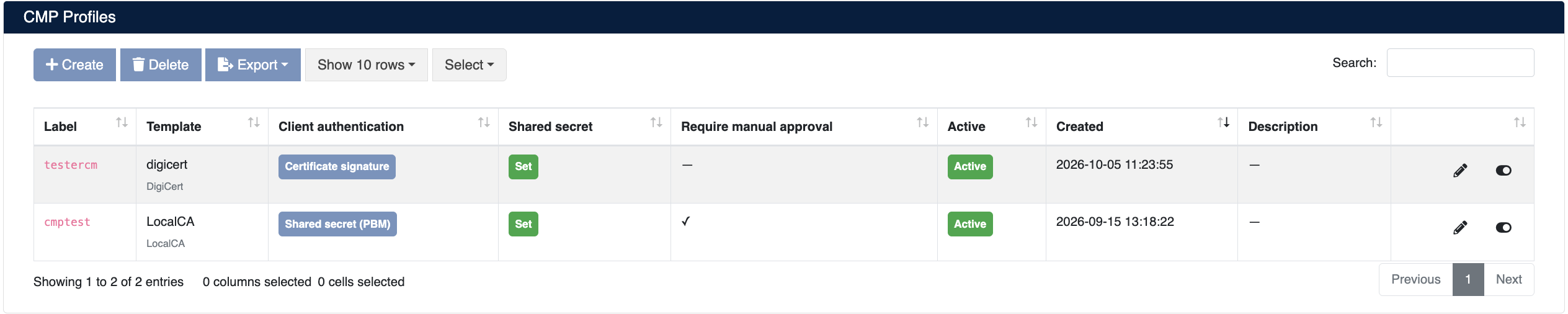
The list screen shows the following information:
| Column | Description |
|---|---|
| Label | The URL path segment and endpoint name of the profile |
| Template | The certificate template it is bound to and the template's CA type (e.g., LocalCA, DigiCert) |
| Client authentication | The accepted authentication method (Shared secret (PBM), Certificate signature, Shared secret or signature) |
| Shared secret | Whether a shared secret is set (Set / Not set). The secret itself is not shown. |
| Require manual approval | Whether manual approval is enabled (✓ / —) |
| Active | Whether the profile is enabled (Active) or disabled (Inactive) |
| Created | The creation date of the profile |
| Description | The profile description |
Profile Actions
- Edit: Edit the profile settings
- Enable/Disable: Use the toggle at the end of the row to disable or re-enable the profile
- Delete: Delete the profile
- Export: Export the list
When a profile is disabled, new certificate enrollments cannot be performed through that profile's endpoint. Keep in mind that the certificate processes of devices bound to the profile will be affected.
Manual Approval
When Require manual approval is enabled on the profile, additional fields appear on the form:
- Approver groups: Ownership groups whose purpose is Approver. Their members receive the approval request. Groups are managed under Ownership → Groups.
- Approver e-mails: Additional email addresses the approval request is sent to.
- Mail Subject / Mail Content: The subject of the email sent to approvers and the message shown above the request details. If left blank, the default text is used.
The approval process works as follows:
- The device sends an
ir,cr, orp10cr; the request is recorded as pending, and a response with "waiting" status is returned to the device. - An approval workflow is started for the request, and approvers receive an email containing the request details.
- The authorized person resolves the request through the workflow or with the Approve (✓) / Deny (✕) buttons on the CMP Transactions screen.
- The device sends a
pollReqwith the same Transaction ID (the suggested polling interval is 30 seconds). If the request was approved, it receives the certificate; if it was denied, it receives a rejection.
If the device resubmits its request with the same key under a new Transaction ID instead of polling, no second approval request is created; the pending request is moved to the new Transaction ID. If a previously approved request is submitted again, the issued certificate is delivered directly.
CMP Transactions
All enrollment operations performed by devices are tracked under Certificate Authorities (CA) > CMP Server > CMP Transactions:
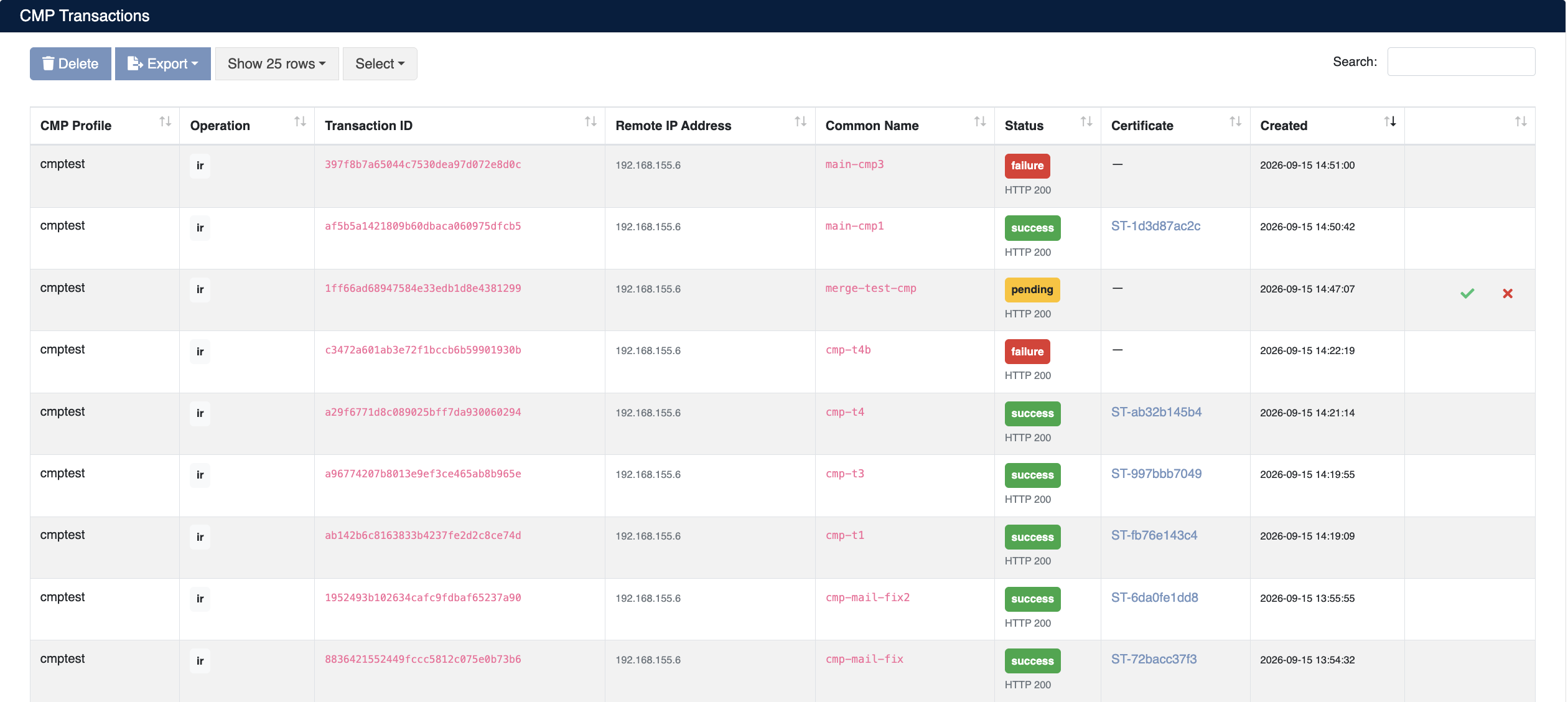
The list screen shows the following information:
| Column | Description |
|---|---|
| CMP Profile | The CMP profile on which the operation was performed |
| Operation | The operation type (ir, cr, p10cr) |
| Transaction ID | The transaction ID the client sent in its CMP message. Pending requests are polled with this ID. |
| Remote IP Address | The IP address of the device that sent the request |
| Common Name | The CN value of the requested certificate |
| Status | The operation result (success, pending, failure) and the HTTP status code |
| Certificate | A link to the issued certificate's record in the inventory |
| Created | The date the operation was performed |
For operations in pending status, Approve (✓) and Deny (✕) buttons appear at the end of the row. Selected transaction records can be deleted with the Delete button, and the list can be exported with Export.
For successful operations, click the certificate number in the Certificate column to go to its record in the inventory, where you can download, monitor, or revoke the certificate.
Authentication errors (a wrong shared secret, a method the profile does not accept, a signer certificate that does not chain to the profile's CA) are returned to the client as a CMP error message. The error text on the client side states the cause of the problem.
Client Configuration Examples
The examples below use the openssl cmp command that ships with OpenSSL 3.x. Replace cm.sectrail.local with your own SecTrail CM address and devices with your profile's Label value.
Initial Enrollment with a Shared Secret (ir)
openssl genrsa -out device.key 2048

openssl cmp -cmd ir \
  -server https://cm.sectrail.local/cmp/devices \
  -ref device01 \
  -secret pass:SHARED_SECRET \
  -newkey device.key \
  -subject "/CN=device01.sectrail.local" \
  -sans "device01.sectrail.local" \
  -certout device.crt
New Certificate Request with a Certificate Signature (cr)
The device signs the message with a certificate it previously obtained from the profile's CA. Because the server response is signed by the CA, the CA certificate must be provided with -trusted:
openssl genrsa -out new.key 2048

openssl cmp -cmd cr \
  -server https://cm.sectrail.local/cmp/devices \
  -cert device.crt -key device.key \
  -trusted ca.crt \
  -newkey new.key \
  -subject "/CN=device01.sectrail.local" \
  -certout new.crt
Request with a PKCS#10 CSR (p10cr)
openssl cmp -cmd p10cr \
  -server https://cm.sectrail.local/cmp/devices \
  -ref device01 \
  -secret pass:SHARED_SECRET \
  -csr device.csr \
  -certout device.crt
If manual approval is enabled on the profile, openssl cmp automatically keeps polling with pollReq until the request is approved.