AWS Private CA
SecTrail CM integrates with AWS Private CA (AWS Certificate Manager Private Certificate Authority - ACM PCA) to enable automatic requesting, issuance, and management of SSL/TLS certificates from your cloud-managed private PKI infrastructure.
AWS Private CA is a private CA service that lets your organization build and manage its own root and subordinate certificate hierarchy in the AWS cloud. It is ideal for internal TLS, mTLS, service-to-service authentication, and IoT scenarios.
Connection Requirements
| Requirement | Detail | Description |
|---|---|---|
| Protocol | HTTPS | AWS ACM PCA API is used |
| Authentication | Access Key | Authentication with AWS Access Key ID / Secret Access Key |
| Permission | ACM PCA certificate issuance permission | IssueCertificate, GetCertificate, RevokeCertificate permissions |
| Region | AWS region where the CA is located | The region where the Private CA is defined must be selected |
AWS credentials (Access Key) are defined through Automation > Device Users and can be stored securely via CyberArk integration.
Automatic Operations
SecTrail CM automatically performs the following operations on AWS Private CA:
- Certificate Request: CSR (Certificate Signing Request) submission
- Certificate Issuance: Automatic certificate issuance through ACM PCA
- Certificate Retrieval: Importing the issued certificate into the SecTrail CM inventory
- Certificate Revocation: Revoking an issued certificate on the CA
- Validity Management: Per-profile default validity period and short-lived certificate support
Configuration Steps
1. Add AWS Private CA Profile
Navigate to Certificate Authorities (CA) > AWS Private CA and click the Add New AWS Private CA Profile button:
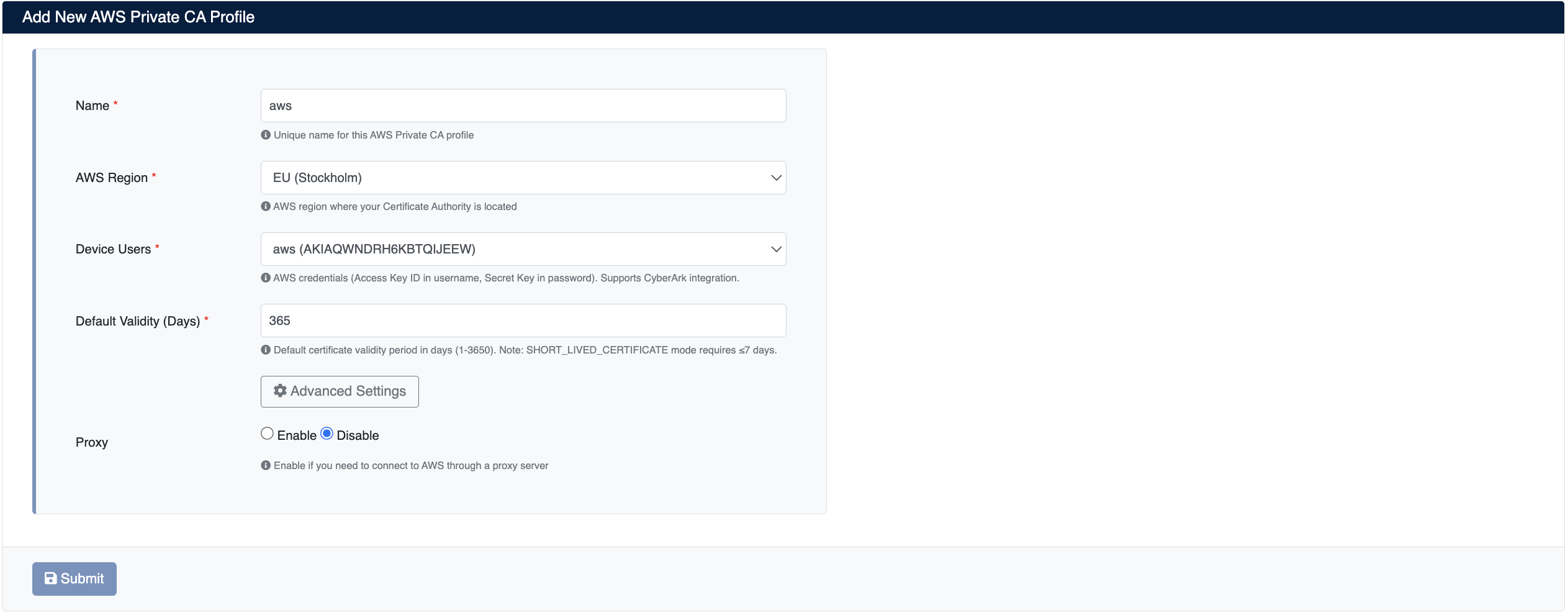
Enter the following information:
- Name: A unique name for this AWS Private CA profile
- AWS Region: The AWS region where your Certificate Authority (CA) is located (e.g.
EU (Stockholm)/eu-north-1) - Device Users: AWS credentials. The Access Key ID corresponds to the username field and the Secret Access Key to the password field. You can create a user from Automation > Device Users and select it here. CyberArk integration is supported.
- Default Validity (Days): Default certificate validity period (in days, between 1 and 3650).
- Advanced Settings: Advanced configuration options. The Default Template ARN can be defined in this section:
- Default Template ARN (Optional): Default certificate template ARN (e.g.
arn:aws:acm-pca:::template/EndEntityCertificate/V1). Leave blank to use the defaultEndEntityCertificate/V1template.
- Default Template ARN (Optional): Default certificate template ARN (e.g.
- Proxy: Enable if you need to connect to AWS through a proxy server (Enable / Disable). After enabling the proxy, complete your proxy configuration from Settings → Proxy.
Click the Submit button to save the profile.
2. View AWS Private CA Profiles
After the profile is added, it will be displayed in the Certificate Authorities (CA) > AWS Private CA list:

The list screen displays the following information:
Name: The unique name of the profile.
Region: The AWS region where the Private CA is defined.
Auth Method: The authentication method (Access Key).
CA Details: When the connection is verified, the status of the CA (ACTIVE) and the Subject information of the root/subordinate CA (CN, O, OU, C, ST) are displayed. For example: CN=SecTrailCM Issuing CA, O=BNTPRO, OU=SecTrailCM, C=TR, ST=ISTANBUL.
Profile Operations
The following operations can be performed for each profile:
- Refresh: Re-fetches the profile information and CA status from AWS
- Edit: Edit the profile connection settings
- Delete: Delete the profile
Orders
After a certificate request is sent to AWS Private CA, you can track all issued and revoked orders at:
Certificate Authorities (CA) > AWS Private CA > Orders
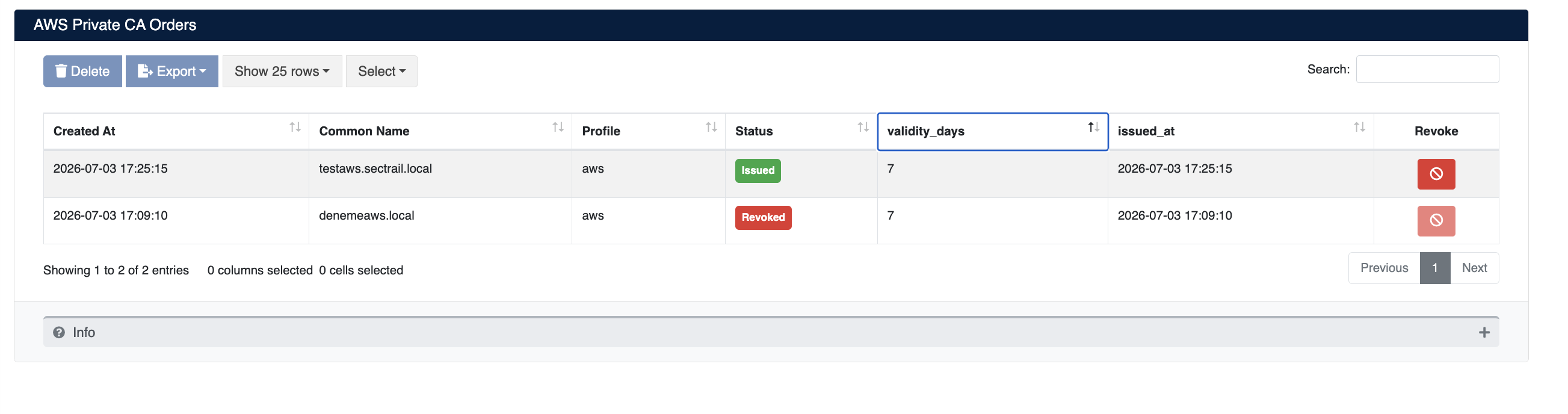
Unlike ADCS, AWS Private CA issues certificates automatically without waiting for approval. When a request is submitted, the certificate immediately transitions to the Issued state and is imported into the SecTrail CM inventory.
Order Fields
| Field | Description |
|---|---|
| Created At | Date and time the certificate request was created |
| Common Name | The domain name the certificate was issued for |
| Profile | The AWS Private CA profile the request was sent to |
| Status | The current status of the order (Issued / Revoked) |
| validity_days | The validity period of the certificate (in days) |
| issued_at | Date and time the certificate was issued |
| Revoke | Action button used to revoke an issued certificate on the CA |
Order Statuses
- Issued 🟢: The certificate has been successfully issued and imported into the inventory
- Revoked 🔴: The certificate has been revoked on the CA
Order Operations
- Revoke: Revokes an issued certificate on AWS Private CA. Revoked certificates are marked as invalid through the CRL (Certificate Revocation List).
- Delete: Delete the order record
Revoking a certificate ensures that it is no longer trusted. The revocation operation cannot be undone — a revoked certificate cannot be reactivated; a new certificate must be issued in its place.
With the AWS Private CA integration, you can perform certificate signing using your organization's private PKI hierarchy. The validity period and CA configuration determine the certificate's intended use and security level.