OAuth 2.0 / OpenID Connect Integration
SecTrail MFA v2.1 acts as an OAuth 2.0 Authorization Server and OpenID Connect (OIDC) Identity Provider, enabling integration with server-side web applications. This allows applications to leverage SecTrail MFA's MFA protection for user authentication.
Overview
Supported Grant Types
| Grant Type | Use Case |
|---|---|
| Authorization Code | Web applications (server-side) |
OIDC Endpoints
SecTrail MFA exposes the following standard OIDC endpoints:
| Endpoint | URL | Description |
|---|---|---|
| Discovery | /.well-known/openid-configuration | OIDC configuration metadata |
| Authorization | /oauth/authorize | Authorization initiation |
| Token | /oauth/token | Token acquisition and renewal |
| UserInfo | /oauth/userinfo | Authenticated user information |
| JWKS | /oauth/jwks | RSA public key set |
| End Session | /oauth/logout | Session termination |
All configuration information is accessible via the Discovery endpoint:
GET /.well-known/openid-configuration
Example response:
{
  "issuer": "https://register.sectrail.local",
  "authorization_endpoint": "https://register.sectrail.local/oauth/authorize",
  "token_endpoint": "https://register.sectrail.local/oauth/token",
  "userinfo_endpoint": "https://register.sectrail.local/oauth/userinfo",
  "jwks_uri": "https://register.sectrail.local/oauth/jwks",
  "end_session_endpoint": "https://register.sectrail.local/oauth/logout",
  "grant_types_supported": ["authorization_code", "refresh_token", "client_credentials"],
  "response_types_supported": ["code"],
  "response_modes_supported": ["query"],
  "subject_types_supported": ["public"],
  "id_token_signing_alg_values_supported": ["RS256"],
  "token_endpoint_auth_methods_supported": [
    "client_secret_basic",
    "client_secret_post",
    "none"
  ],
  "code_challenge_methods_supported": ["S256"],
  "scopes_supported": ["openid", "profile", "email", "phone", "offline_access"],
  "backchannel_logout_supported": true,
  "backchannel_logout_session_supported": true
}
OAuth Client Management
OAuth clients are created and managed from the OAuth → Clients menu in the Admin Panel.
Creating a New Client
Navigate to Admin Panel → OAuth → Clients → New Client.
Configuration fields:
| Field | Description | Example |
|---|---|---|
| Name | Display name of the client | Corporate Portal |
| Redirect URI | Redirect address after authorization | https://app.example.com/callback |
| Consent Required | Whether to show a consent screen to the user | Enabled / Disabled |
| Backchannel Logout URI | Back-channel logout endpoint (optional) | https://app.example.com/backchannel-logout |
| Scopes | Scopes the client is allowed to request | openid, profile, email |
After the client is created, the system automatically generates:
- Client ID: The client's public identifier
- Client Secret: The secret key used for token endpoint authentication
These values can be viewed in the client list.
Client Properties
Access Token Lifetime: 60 minutes by default. Can be customized per client.
Refresh Token Lifetime: 1440 minutes (24 hours) by default.
Consent Screen: For clients with consent_required enabled, users will see an approval screen on first authorization showing which information will be shared. Sensitive data (phone, email) is masked on this screen.
Auto-Approve: If consent_required is disabled and a valid token exists for the user, authorization is performed automatically without requesting consent again.
Authorization Code Flow
1. Authorization Request
The application redirects the user to the following URL:
GET /oauth/authorize
  ?response_type=code
  &client_id=<CLIENT_PUBLIC_ID>
  &redirect_uri=https://app.example.com/callback
  &scope=openid profile email
  &state=<RANDOM_STATE>
  &nonce=<RANDOM_NONCE>
| Parameter | Required | Description |
|---|---|---|
response_type | Yes | Always code |
client_id | Yes | The client's public_id value |
redirect_uri | Yes | The redirect URI registered on the client |
scope | Yes | Requested scopes (space-separated) |
state | Recommended | Random value for CSRF protection |
nonce | Recommended | Protects against ID Token replay attacks |
prompt | No | Can be none, login, or consent |
prompt parameter:
login: Forces re-authentication even if a valid session exists.consent: Shows the consent screen even if a valid token exists.none: Authorization without interaction; returns an error if no user session exists.
2. User Authentication and MFA
SecTrail MFA redirects the user to the registration panel login page. The user authenticates using the configured MFA method.
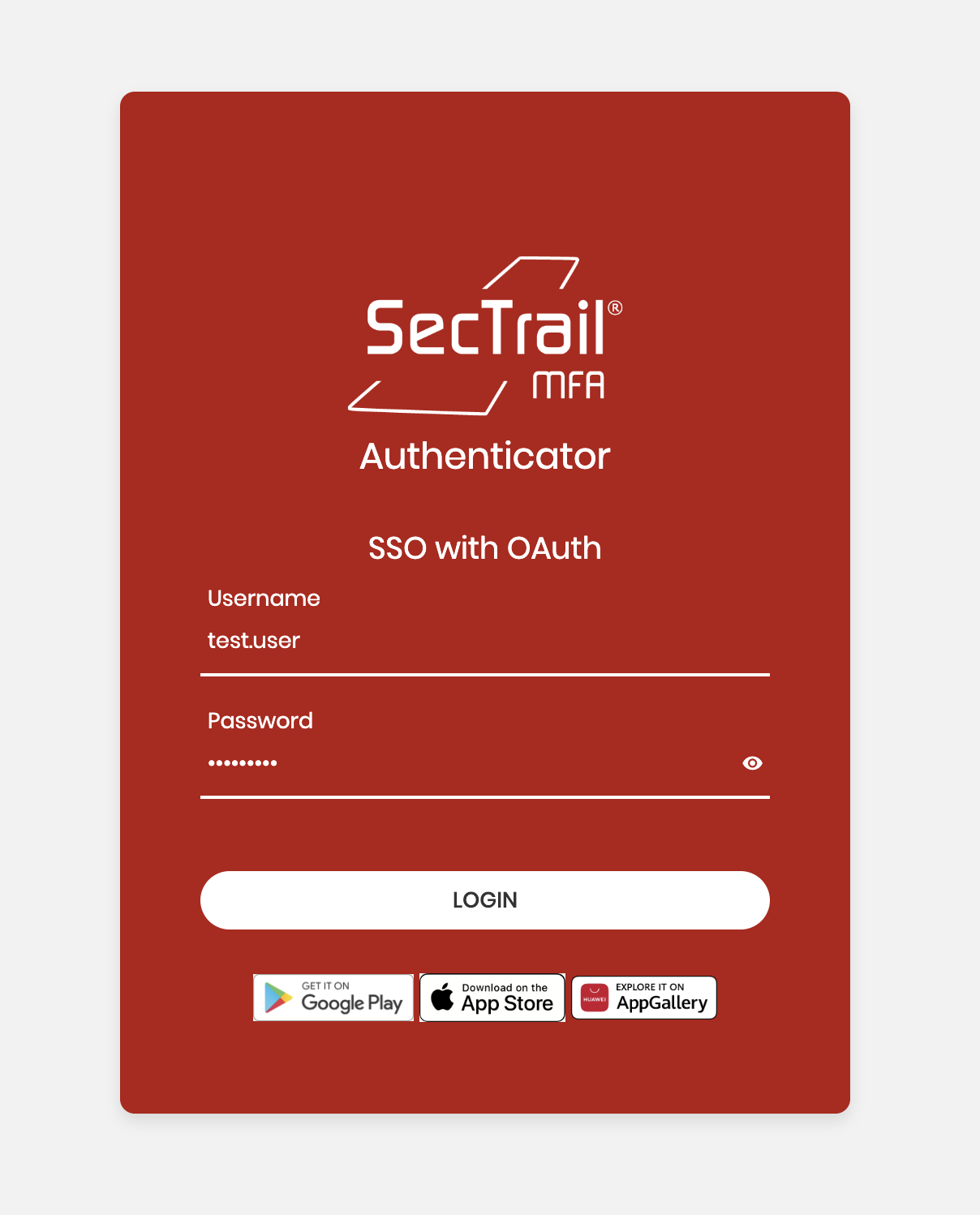
User Login Form
3. Consent Screen (If Required)
If consent_required is enabled, the user is shown a consent screen displaying the information that will be shared. The user selects Authorize or Cancel.
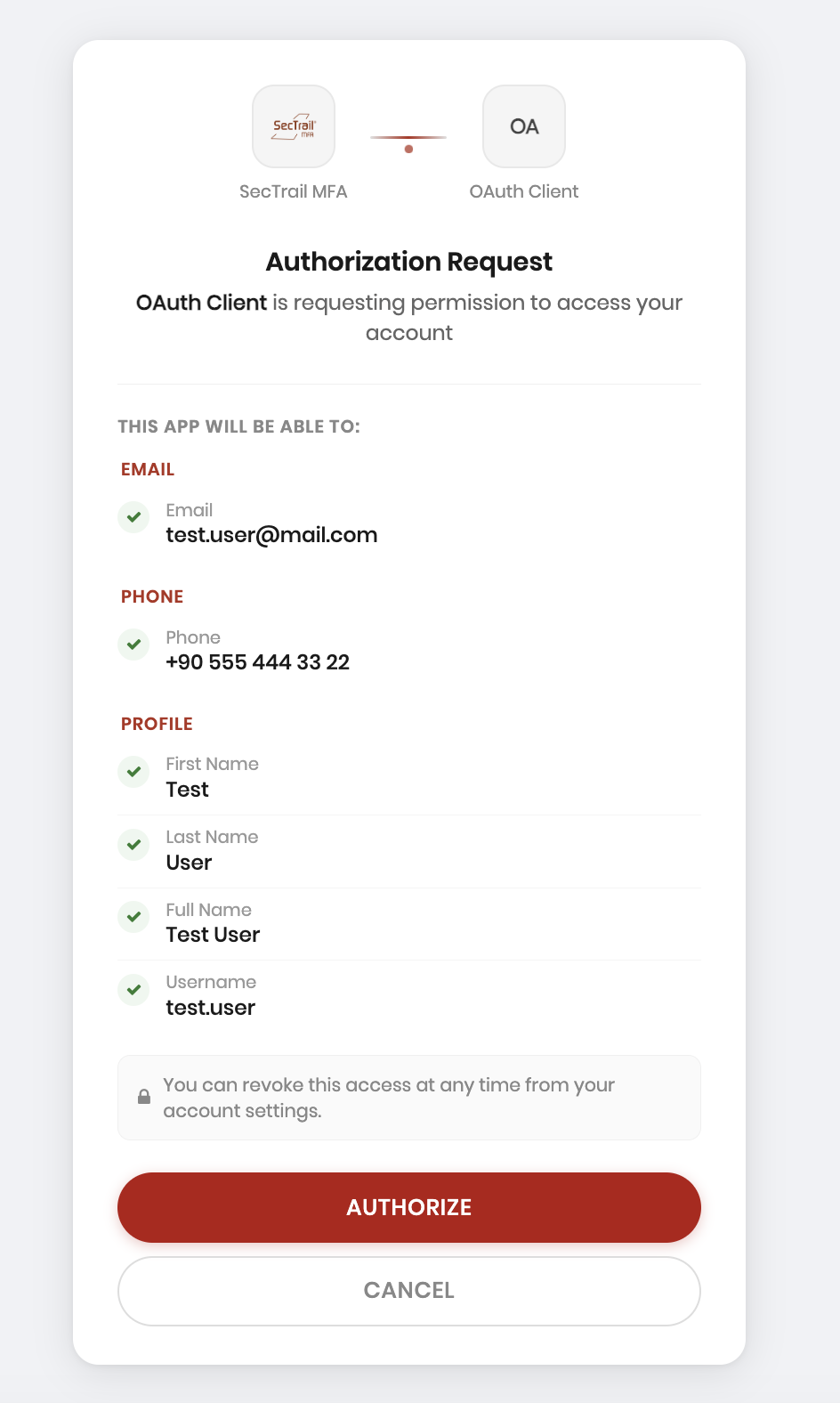
Consent Screen
4. Authorization Code Receipt
After approval, the user is redirected to the redirect_uri:
https://app.example.com/callback?code=<AUTH_CODE>&state=<STATE>
5. Token Acquisition
The application calls the token endpoint with the authorization code:
POST /oauth/token
Content-Type: application/x-www-form-urlencoded

grant_type=authorization_code
&code=<AUTH_CODE>
&redirect_uri=https://app.example.com/callback
&client_id=<CLIENT_PUBLIC_ID>
&client_secret=<CLIENT_SECRET>
Successful response:
{
  "token_type": "Bearer",
  "expires_in": 3600,
  "access_token": "eyJ...",
  "refresh_token": "def5020...",
  "id_token": "eyJ..."
}
6. Token Renewal
POST /oauth/token
Content-Type: application/x-www-form-urlencoded

grant_type=refresh_token
&refresh_token=<REFRESH_TOKEN>
&client_id=<CLIENT_PUBLIC_ID>
&client_secret=<CLIENT_SECRET>
ID Token and Access Token
ID Token Structure
SecTrail MFA produces ID Tokens in JWT format signed with the RS256 algorithm.
Header:
{
  "typ": "JWT",
  "alg": "RS256",
  "kid": "<KEY_ID>"
}
Payload (example):
{
  "iss": "https://register.sectrail.local",
  "sub": "42",
  "aud": "a1b2c3d4-...",
  "exp": 1745123456,
  "iat": 1745119856,
  "jti": "abc123...",
  "nonce": "xyz789",
  "email": "user@example.com",
  "name": "First Last",
  "preferred_username": "user"
}
An ID Token is always produced when the openid scope is requested.
Token Signature Verification
The token signature can be verified using the RSA public key obtained from the JWKS endpoint:
GET /oauth/jwks
{
  "keys": [
    {
      "kty": "RSA",
      "alg": "RS256",
      "use": "sig",
      "kid": "<KEY_ID>",
      "n": "<MODULUS_BASE64URL>",
      "e": "AQAB"
    }
  ]
}
UserInfo Endpoint
User information can be queried with a valid access token:
GET /oauth/userinfo
Authorization: Bearer <ACCESS_TOKEN>
The response is shaped by the scopes the client requested:
{
  "sub": "42",
  "email": "user@example.com",
  "name": "First Last",
  "preferred_username": "user",
  "phone_number": "+905xxxxxxxx"
}
Scope and Claim Management
System Scopes
| Scope | Description |
|---|---|
openid | Base OIDC scope; required for ID Token generation |
profile | User's name and username |
email | Email address |
phone | Phone number |
offline_access | Enables refresh token issuance |
Claim Mapping
From Admin Panel → OAuth → Scopes, you can configure which user field is transmitted under which claim name for each scope.
| Field | Description |
|---|---|
| Claim Name | The field name to be added to the token (e.g., email, phone_number) |
| Source Attribute | LDAP attribute or local user field (e.g., mail, telephoneNumber) |
| User Type | LDAP or Local user |
| Sensitive | If enabled, the value is masked on the consent screen |
Supported attributes for LDAP users: sAMAccountName, mail, givenName, sn, displayName, telephoneNumber, mobile, and other standard AD attributes.
Per-Client Scope Restriction
Each client can only request the scopes assigned to it. Unauthorized scopes are automatically filtered out during authorization.
Logout
Front-Channel Logout
To notify SecTrail MFA when a user logs out of an application:
GET /oauth/logout
  ?id_token_hint=<ID_TOKEN>
  &post_logout_redirect_uri=https://app.example.com/logout-success
  &state=<STATE>
Upon this request, SecTrail MFA revokes all OAuth sessions for the relevant user and redirects to the post_logout_redirect_uri.
Back-Channel Logout
When a user session is terminated (from the admin panel or registration panel), SecTrail MFA sends a POST request containing a logout_token to the client's backchannel_logout_uri:
POST https://app.example.com/backchannel-logout
Content-Type: application/x-www-form-urlencoded

logout_token=<LOGOUT_JWT>
The logout_token is an RS256-signed JWT. Its header uses "typ": "logout+jwt" and it contains the following claims:
Header:
{
  "typ": "logout+jwt",
  "alg": "RS256",
  "kid": "<KEY_ID>"
}
Payload:
{
  "iss": "https://register.sectrail.local",
  "sub": "42",
  "aud": "<CLIENT_PUBLIC_ID>",
  "iat": 1745119856,
  "exp": 1745120156,
  "jti": "<UUID>",
  "events": {
    "http://schemas.openid.net/event/backchannel-logout": {}
  }
}
OAuth Session Management
Viewing Sessions in the Admin Panel
All active OAuth sessions can be viewed from Admin Panel → OAuth → Sessions:
| Field | Description |
|---|---|
| User | The username that opened the session |
| Client | The connected OAuth client |
| IP Address | The IP address from which the session was opened |
| User Agent | Browser / client information |
| Created At | Session start time |
Administrator actions:
- List active sessions
- Terminate a specific session (token revocation + back-channel logout)
Session Management in the Registration Panel
Users can view and terminate their own OAuth sessions from Registration Panel → My Sessions.
Users can immediately terminate any session opened from an unrecognized device or IP address. This feature provides a critical control mechanism for account security.
Supported Authentication Methods
MFA methods available during the OAuth flow:
- LDAP Verification: Authentication with Active Directory / LDAP
- Local Verification: SecTrail MFA local user database
- LDAP + OTP: Two-factor authentication with password and OTP
- Soft OTP: TOTP via SecTrail Authenticator application
- SMS OTP: One-time password sent via SMS
- Mail OTP: One-time password sent via email
- Push Notification: SecTrail Authenticator push approval
- QR Login (Passwordless): Passwordless login by scanning a QR code with the mobile application
- WebAuthn (FIDO2): FIDO2-compliant hardware keys
Technical Requirements
Client Requirements
- The
redirect_urimust exactly match the value in the client configuration (including trailing slash). - The JWKS endpoint should be used for token signature verification; do not hard-code the public key.
For OAuth 2.0 integration, your application must support the Authorization Code Grant.