ACME Server
SecTrail CM includes a built-in ACME Server (RFC 8555). This allows the servers, containers, and automation tools in your organization to obtain and automatically renew certificates through SecTrail CM using standard ACME clients such as Certbot, acme.sh, Caddy, Traefik, and win-acme.
Instead of connecting to an external certificate authority such as Let's Encrypt, your ACME clients use SecTrail CM directly as their ACME server. Certificates are issued by the CAs managed by SecTrail CM (Local CA, Microsoft ADCS, etc.) according to the template rules you define.
- ACME Client: SecTrail CM acting as a client to obtain certificates from an external ACME certificate authority (Let's Encrypt, ZeroSSL, Buypass, etc.).
- ACME Server (this document): SecTrail CM acting as a server, publishing its own ACME service and issuing certificates to internal clients.
Benefits
- Internal automation: A fully automated certificate lifecycle, including for internal systems that are not exposed to the internet
- Standard clients: Compatibility with widely used tools such as Certbot, acme.sh, Caddy, Traefik, and Kubernetes cert-manager
- Centralized control: Which client can obtain certificates with which template is determined through EAB
- Full visibility: All issued certificates are automatically recorded in the SecTrail CM inventory
- Short-lived certificates: Frequent renewal strategies can be applied without creating manual workload
How It Works
The core components of the ACME Server are:
| Component | Description |
|---|---|
| EAB Credential | The credential the client uses when registering an ACME account (kid + HMAC key). It is bound to a template and can optionally be restricted to specific domains. |
| Account | An ACME client account registered with an EAB. The account inherits the template of the EAB it is bound to. |
| Order | A certificate request created by an account for specific domain(s). |
The flow proceeds as follows:
- The administrator creates an EAB Credential in SecTrail CM and binds it to a certificate template.
- The generated
kidand HMAC key are shared with the relevant server/team. - The client performs an account registration against the SecTrail CM ACME Server using these EAB details.
- The client creates an order; the domain validation (challenge) is completed. This step is skipped if the domain is listed in the EAB's Allowed Identifiers.
- The certificate is issued according to the template rules bound to the EAB and is added to the inventory.
- The client automatically renews the certificate with the same account before it expires.
An EAB credential can only produce certificates against the template it is bound to. The template determines which CA will be used, the validity period, key usage, and other certificate parameters. For template management, see Inventory → Issue Certificate → Templates.
EAB Credentials (External Account Binding)
EAB (External Account Binding) is an RFC 8555 mechanism that binds an ACME account to an identity that has been pre-authorized in your organization. EAB is mandatory for registering an account on the SecTrail CM ACME Server, so that only clients that have been issued a credential can obtain certificates.
Creating an EAB Credential
Navigate to Certificate Authorities (CA) > ACME Server > EAB Credentials and click the Create button:
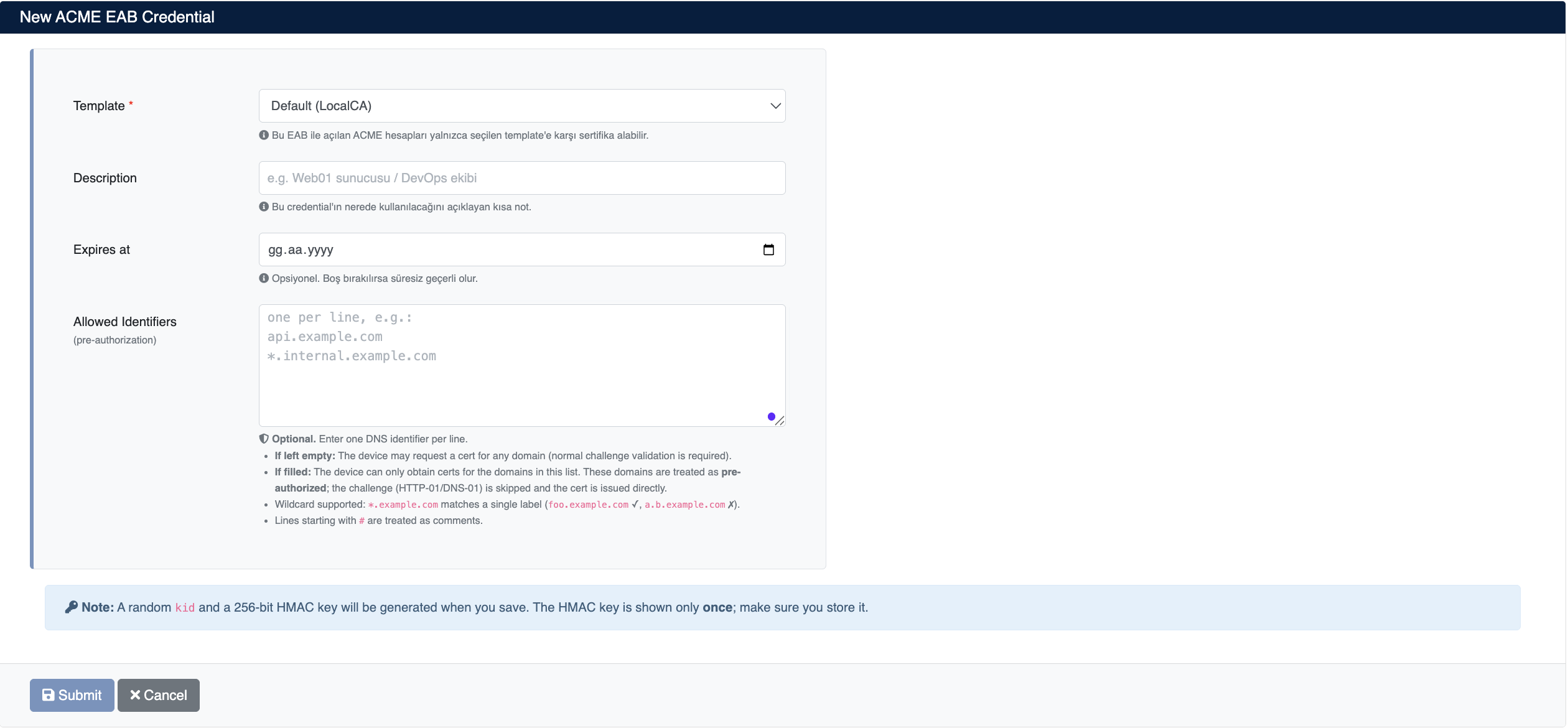
Enter the following information:
- Template (required): The template against which ACME accounts registered with this EAB can obtain certificates. The CA, validity period, and profile information of the certificates the client receives are determined by this template.
- Description (optional): A short note explaining where the credential will be used (e.g.
Web01 server / DevOps team). It helps you distinguish which credential belongs where when managing a large number of them. - Expires at (optional): The expiry date of the credential. If left empty, it is valid indefinitely.
- Allowed Identifiers (optional): The list of domains for which certificates can be obtained with this credential. Enter one DNS identifier per line. If left empty, the client may request a certificate for any domain (normal challenge validation applies). For details, see Allowed Identifiers (Pre-Authorization).
Click the Submit button to create the credential.
When you save, a random kid and a 256-bit HMAC key are generated. The HMAC key is shown only once; make sure you store it somewhere secure before closing the screen. If you lose the key, you will need to create a new EAB credential.
Allowed Identifiers (Pre-Authorization)
Allowed Identifiers lets you restrict the domain names for which an EAB credential can obtain certificates. The field may be left empty; when it is filled in, it acts both as a scope restriction and as a pre-authorization mechanism.
| Case | Behavior |
|---|---|
| If left empty | The client may request a certificate for any domain. Normal challenge validation (HTTP-01 / DNS-01) is required for every requested domain. |
| If filled | The client can only obtain certificates for the domains in the list. These domains are treated as pre-authorized; the challenge step is skipped and the certificate is issued directly. |
Field rules:
- Enter one DNS identifier per line.
- Wildcards are supported:
*.example.commatches a single label (foo.example.com✓,a.b.example.com✗). - Lines starting with
#are treated as comments and ignored.
Example:
api.example.com
*.internal.example.com
web01.example.com
Requests for a domain that is not in the list are rejected, so the list also effectively limits which domain names the client can obtain certificates for.
EAB Credential List
Created credentials are displayed in the Certificate Authorities (CA) > ACME Server > EAB Credentials list:
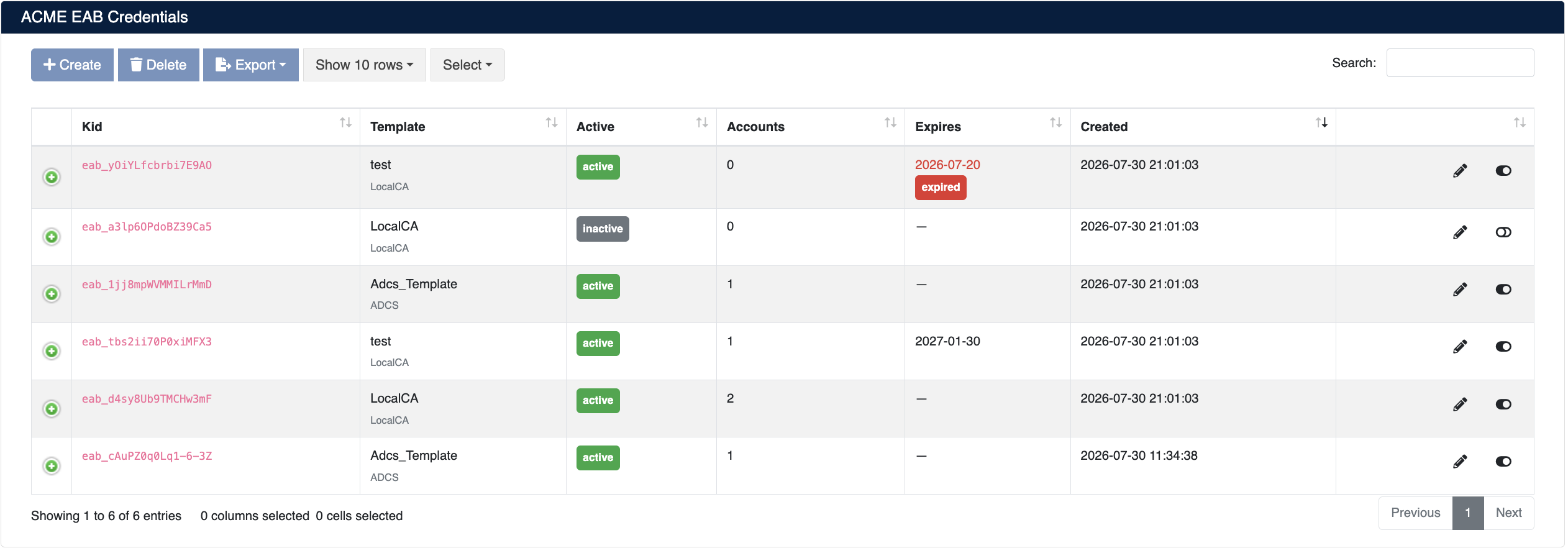
The list screen shows the following information:
| Column | Description |
|---|---|
| Kid | The unique identifier of the credential (starts with the eab_ prefix). Used in the client configuration. |
| Template | The certificate template it is bound to and the CA type of that template (e.g. LocalCA, ADCS) |
| Active | Whether the credential is enabled (active) or disabled (inactive) |
| Accounts | The number of ACME accounts registered with this credential |
| Expires | The expiry date. If it has passed, it is marked with an expired label. — means it does not expire. |
| Created | The date the credential was created |
Credential Operations
- Edit: Edit information such as the description, expiry date, and allowed identifiers
- Enable/Disable: Use the toggle at the end of the row to disable or re-enable the credential
- Delete: Delete the credential
- Export: Export the list
When a credential is disabled or expires, no new ACME account can be registered with it. If you need to immediately stop a server from obtaining certificates, you must also deactivate the relevant ACME account in addition to disabling the credential.
ACME Accounts
When clients register using their EAB details, the resulting accounts are listed under Certificate Authorities (CA) > ACME Server > Accounts:
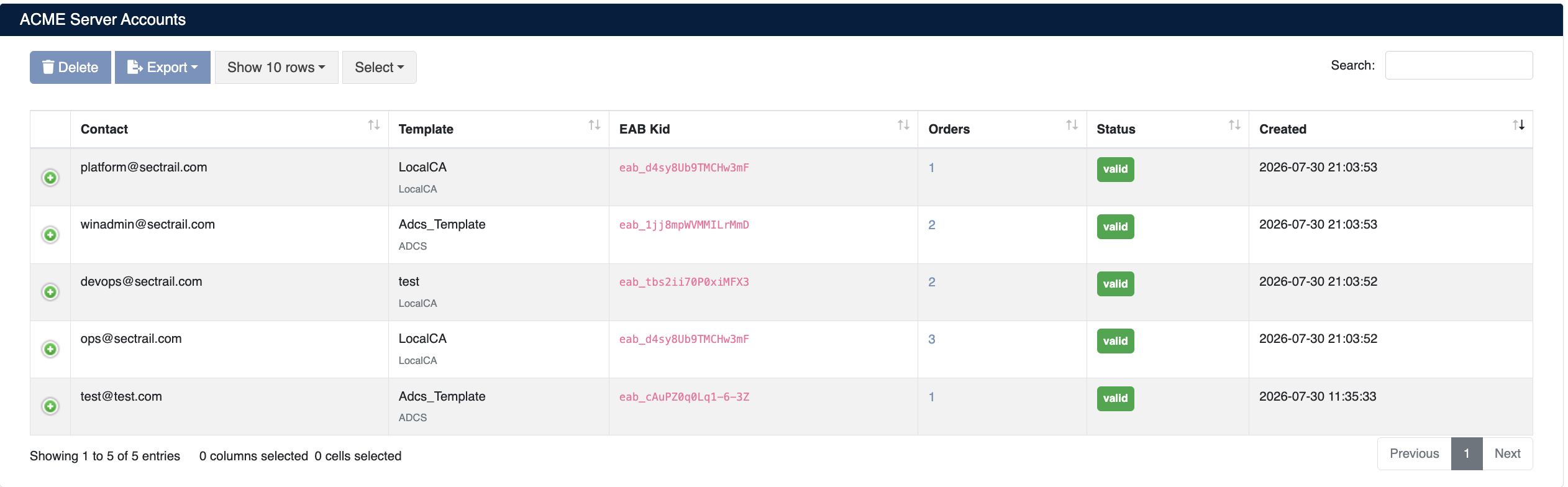
The list screen shows the following information:
| Column | Description |
|---|---|
| Contact | The contact email address the client provided during registration |
| Template | The certificate template of the account (inherited via the EAB) and the CA type |
| EAB Kid | Which EAB credential the account was registered with |
| Orders | The number of orders created by the account |
| Status | The account status (valid, deactivated) |
| Created | The date the account was created |
Account Operations
- Details: View the details of the account using the + icon at the start of the row
- Delete: Delete the account
- Export: Export the list
An account is permanently bound to the template of the EAB credential it used at registration time. A client that wants to obtain certificates with a different template must register a separate account using a new EAB credential bound to that template.
Orders
All certificate requests created by clients are tracked under Certificate Authorities (CA) > ACME Server > Orders:
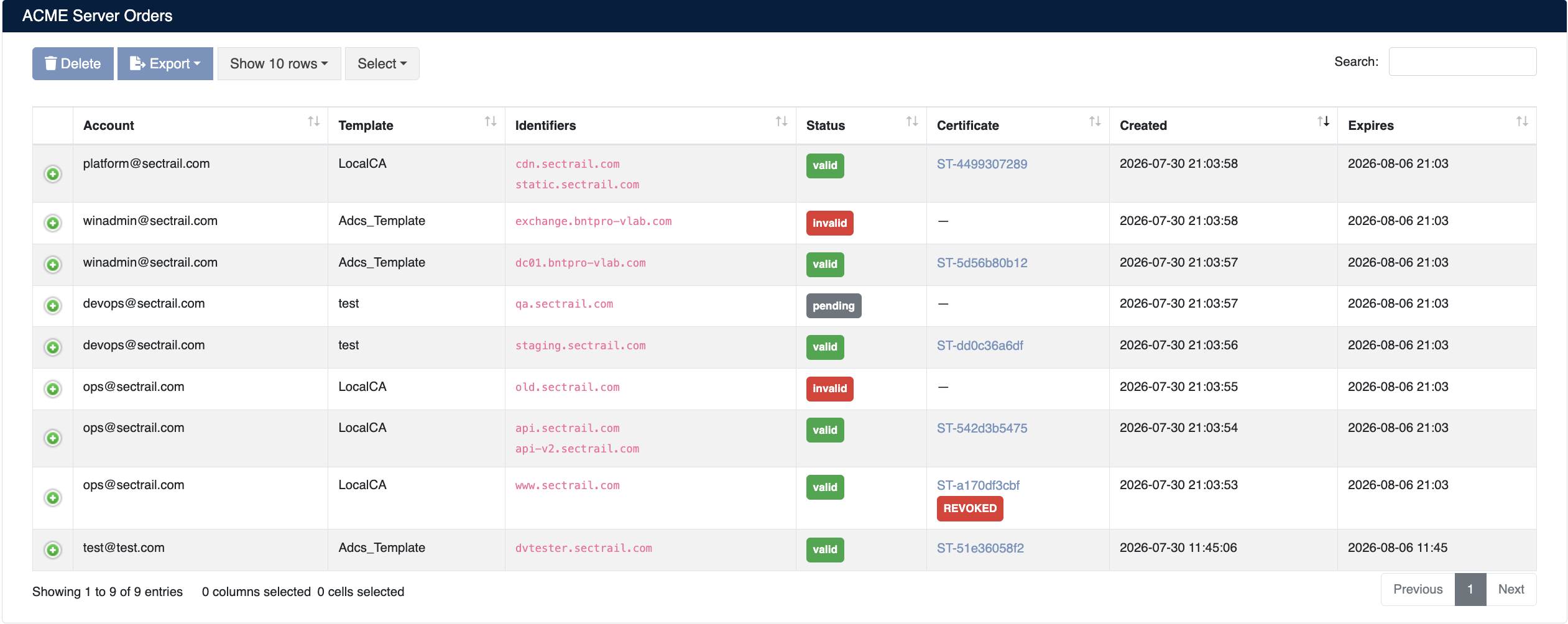
The list screen shows the following information:
| Column | Description |
|---|---|
| Account | The contact address of the ACME account that created the order |
| Template | The template the certificate was issued with |
| Identifiers | The domain names covered by the order. An order may contain more than one domain (SAN). |
| Status | The order status (pending, ready, processing, valid, invalid) |
| Certificate | A link to the inventory record of the issued certificate. Revoked certificates are marked with a REVOKED label. |
| Created | The date the order was created |
| Expires | The validity period of the order (of the ACME order, not the certificate) |
Order Statuses
- pending: The order was created, domain validation (challenge) is pending
- ready: Validation succeeded, the certificate request (finalize) is pending
- processing: The certificate is being issued
- valid: The certificate was successfully issued and added to the inventory
- invalid: Validation failed or the order expired
For orders in the valid state, you can click the certificate number in the Certificate column to go to the inventory record, where you can download, monitor, or revoke the certificate.
Client Configuration Examples
In the examples below, replace acme.sectrail.local with your own SecTrail CM address, and the eab_... and HMAC values with your own EAB credential details.
ACME Directory URL:
https://acme.sectrail.local/acme/directory
Certbot
certbot register \
  --server https://acme.sectrail.local/acme/directory \
  --email ops@sectrail.com \
  --eab-kid eab_d4sy8Ub9TMCHw3mF \
  --eab-hmac-key <HMAC_KEY>

certbot certonly --standalone \
  --server https://acme.sectrail.local/acme/directory \
  -d www.sectrail.com -d api.sectrail.com
acme.sh
acme.sh --register-account \
  --server https://acme.sectrail.local/acme/directory \
  -m ops@sectrail.com \
  --eab-kid eab_d4sy8Ub9TMCHw3mF \
  --eab-hmac-key <HMAC_KEY>

acme.sh --issue \
  --server https://acme.sectrail.local/acme/directory \
  -d www.sectrail.com --standalone
Caddy
{
  acme_ca https://acme.sectrail.local/acme/directory
  acme_eab {
    key_id eab_d4sy8Ub9TMCHw3mF
    mac_key <HMAC_KEY>
  }
}