SSO Integration
SecTrail MFA can integrate with all web applications supporting SAML 2.0 and SSO. Thanks to Single Sign-On (SSO) integration, users can access multiple applications with a single login, and MFA protection is provided for every access.
SAML 2.0 Support
SecTrail MFA functions as a SAML 2.0 Identity Provider (IdP) and provides secure authentication to web applications.
IdP Configuration Steps
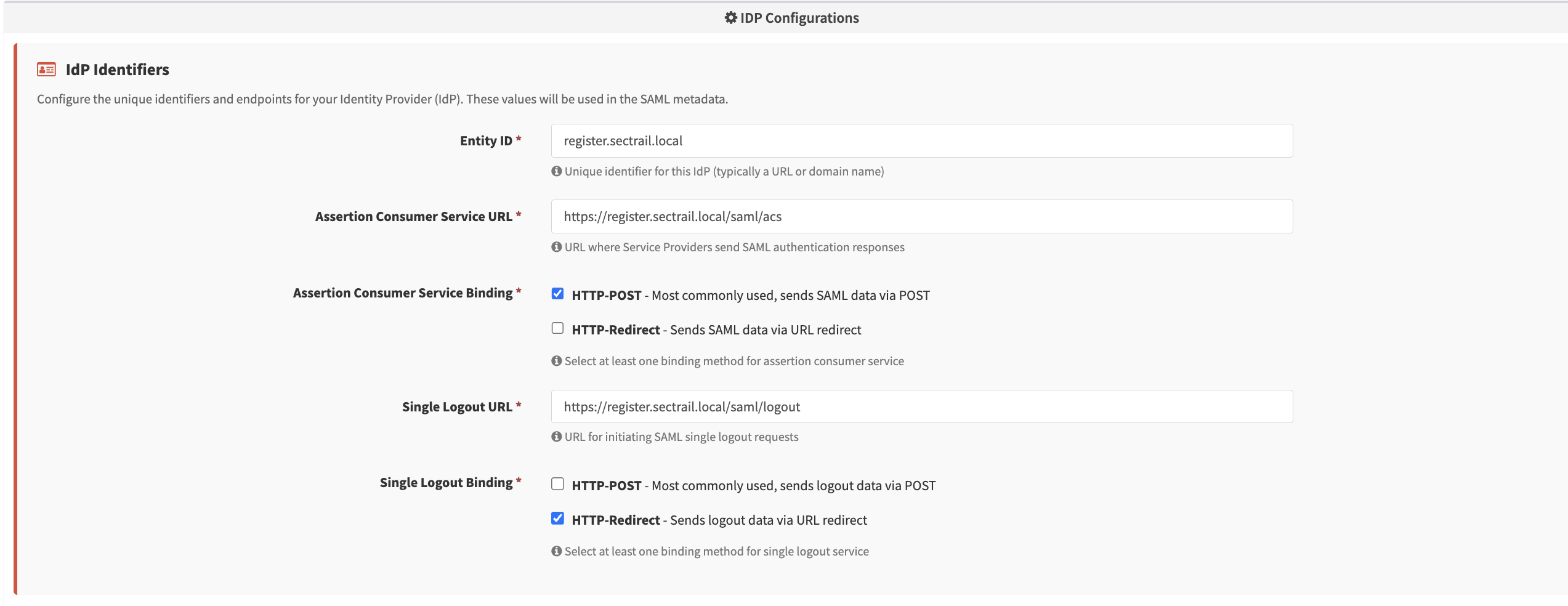
IdP Configuration - Entity ID, ACS/SLO URL, binding methods
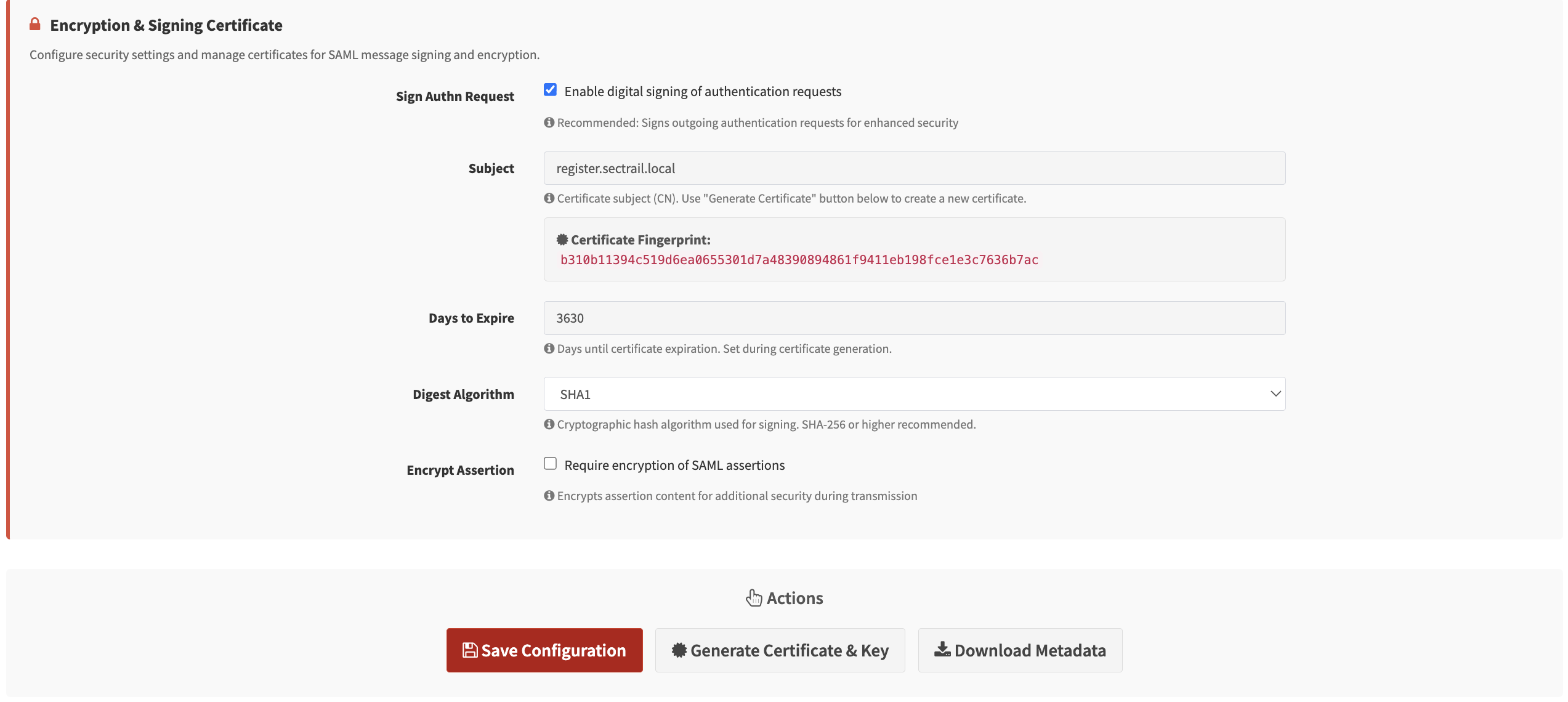
Certificate Settings - Signing and encryption certificate configuration
Supported Scenarios
- Web Applications: SSO access to corporate web applications
- Portal Systems: Corporate portals and intranet sites
- Custom Applications: Custom applications supporting SAML 2.0
Key Features
🔐 IdP-Initiated and SP-Initiated Flow
- IdP-Initiated: The user accesses the application through the SecTrail MFA portal
- SP-Initiated: The user goes directly to the application, and is redirected to SecTrail MFA
🔄 Session Management
- Management of SSO session duration
- Single Logout (SLO) support
- Viewing users' active SSO sessions
SSO Session Management
Viewing User's Own SSO Sessions
Users can view their own active SSO sessions by logging into the Registration Panel:
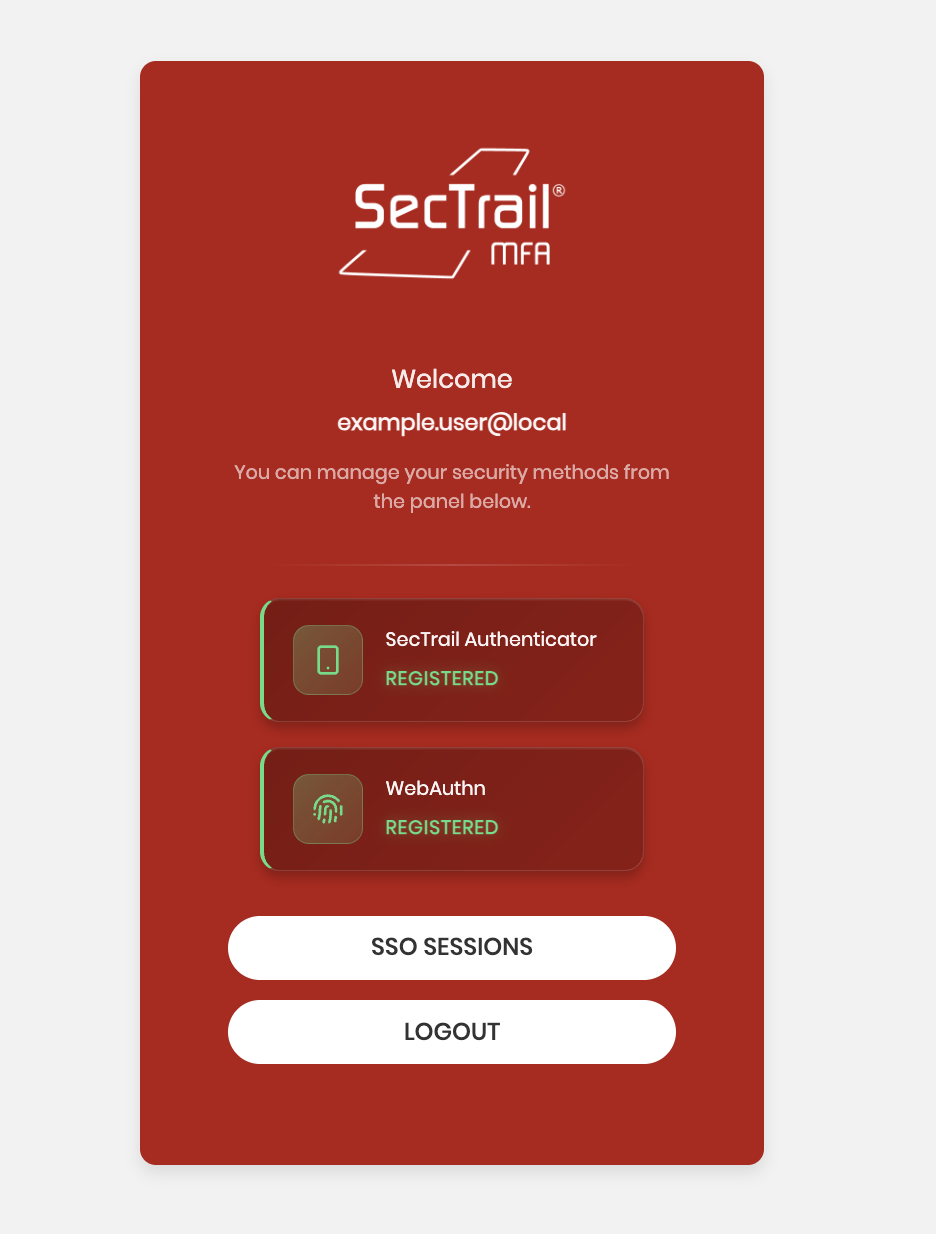
Users can view their active sessions and terminate any session they want:
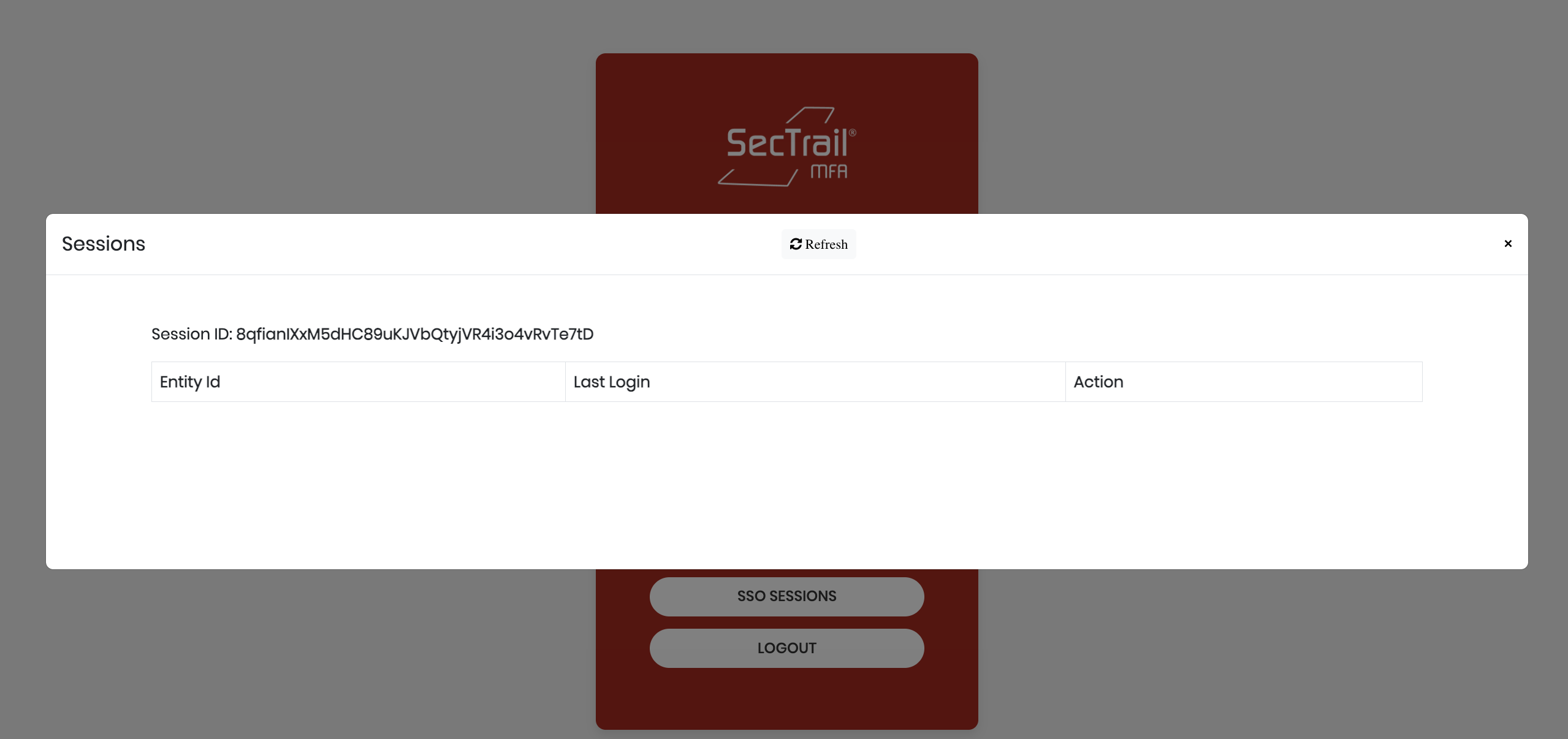
Session Information:
When users view their own SSO sessions from the registration panel, they can see the following information:
- Session ID: Unique session identifier (e.g.,
8qfianiXxM5dHC89uKJVbQtyjVR4i3o4vRvTs7tD) - Entity ID: Identity of the application accessed via SSO
- Last Login: Most recent login time
In the admin panel, all users' sessions are displayed with the following information:
- Session ID: Unique session identifier
- User: Username (e.g.,
example.user@local) - IP Address: IP address from which the login was made (e.g.,
10.34.12.62) - Last Activity: Last activity time (e.g.,
2025-12-04 14:45:46) - Actions: Session termination button
Managing All SSO Sessions (Admin Panel)
Administrators can view and manage all users' SSO sessions through the Admin Panel:
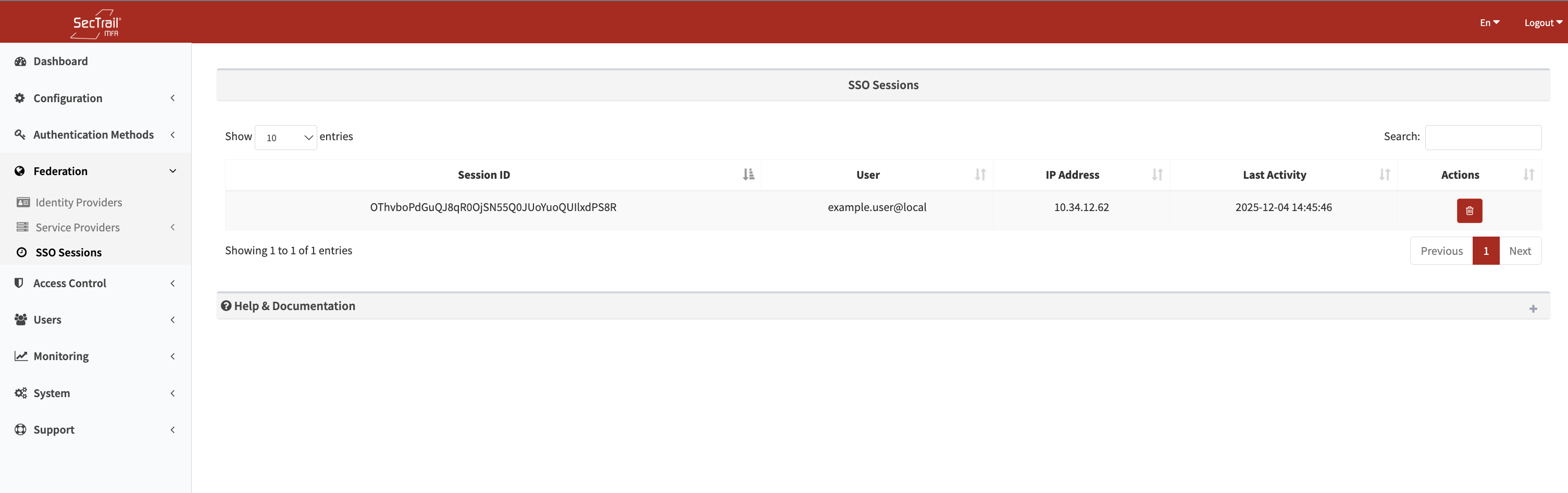
Administrator Actions:
- List all active SSO sessions
- Filter by user
- Filter by application
- Terminate a specific session
- Bulk session termination
- View session history
When users see a suspicious session (an IP or device they don't recognize), they can immediately terminate it. This feature is an important protection layer for account security.
Configuration

SP Manual Entry - Entity ID, ACS URL, certificate, and binding configuration
1. Service Provider (SP) Definition
You need to define a new SAML Service Provider in SecTrail MFA:
- Entity ID: The unique identifier of the application
- ACS URL: Assertion Consumer Service URL
- Binding: HTTP-POST or HTTP-Redirect
- NameID Format: Email, persistent, transient, etc.
2. Metadata Exchange
SecTrail MFA provides the SAML metadata file:
- Automatic configuration via the IdP metadata URL
- Manual metadata import/export
3. MFA Policies
You can define different MFA policies for each SAML application:
- Which factors will be used
- Different policies based on user groups
- Risk-based adaptive authentication
Supported Authentication Methods
Authentication methods that can be used in SSO integration:
- LDAP Verification: Authentication with an Active Directory or LDAP server
- Local Verification: Authentication with SecTrail MFA's local user database
- LDAP+OTP: Two-factor authentication with password + OTP in a single screen
- Soft OTP: Time-based one-time password via mobile application (SecTrail Authenticator)
- SMS OTP: One-time password sent via SMS
- Mail OTP: One-time password sent via Email
- Push Notification Verification: Approval via push notification through the mobile application (SecTrail Authenticator)
- Approved OTP: Verification with pre-approved OTP codes
- Mail Link Approval: Approval via a link sent through email
- QR Login (Passwordless): Passwordless login by scanning a QR code with the mobile application
- WebAuthn (FIDO2 hardware keys): Secure login with FIDO2 compliant hardware keys
For SAML integration, your application must support the SAML 2.0 Service Provider (SP) role.