Secure Access Policies in MFA
Using MFA is now a starting point — but it is no longer sufficient on its own. Authentication works like a door lock: whoever has the right key gets in. But what if someone steals the key? What if the login attempt happens far outside business hours? What if the connection comes from a country the user has never accessed the system from before? Is your system asking these questions — or is it only checking whether the key is correct?
Authentication Is Not the Same as Access Control
Most MFA solutions answer a single question: “Is this user really who they claim to be?” In reality, security questions are far more layered:
- Does this user normally log in at this hour?
- Is this request coming from the country where the user operates?
- Does the source IP belong to a trusted corporate network?
- Is this number of failed attempts normal within a short time frame?
If your system cannot answer these questions, it is authenticating identity — but not controlling access.
Context-Aware Access: A Policy Layer for Every Question
Modern access control architectures rely on a policy engine that evaluates context before MFA is even triggered. Before the user is prompted for MFA, the system analyzes the connection context. If a rule is violated, the connection is blocked immediately — without proceeding to authentication.
“Where Is This Request Coming From?” — Geo Location Control
According to the 2022 Verizon DBIR report, the majority of credential-based attacks originate from outside the organization’s operating geography. GeoIP-based access control turns this reality directly into a security layer.
Connections can be allowed only from specific countries. The rule can be defined globally for the entire system or configured specifically for certain applications or user groups — such as restricting financial system access to Turkey only, while enabling a multi-country configuration for support teams.
“Is Access Expected at This Hour?” — Time-Based Restrictions
This is exactly the question missing in systems that fail to ask it. Time-based policies block access outside business hours even if correct credentials are presented. Access during maintenance windows can also be controlled in the same way.
- Completely disable access outside business hours (e.g., Mon–Fri 08:00–18:00).
- Freeze system access during scheduled maintenance windows.
- Manage global teams from a single platform with multiple time zone support.
“Do We Recognize This Network?” — IP-Based Access Management
Whitelists can be defined for corporate VPNs, office networks, or data center IP ranges; blacklists can be created for known suspicious addresses. This ensures that only connections from recognized networks are accepted, while requests from unknown sources are rejected even if credentials are correct.
“Is Something Suspicious Happening on This Account?” — Automatic and Manual Blocking
In credential stuffing attacks, attackers systematically attempt thousands of compromised username/password combinations. When the failed login threshold is exceeded, automatic account lockout is triggered to stop these attacks early. Administrators can also manually suspend suspicious accounts; temporary locks can automatically be lifted after a defined period.
“Is the Entity in Front of Us a Real Human?” — CAPTCHA Protection
After a certain number of failed login attempts, an automatic CAPTCHA challenge is triggered. With Google reCAPTCHA integration, bot-based attacks are blocked while the experience of legitimate users is preserved.
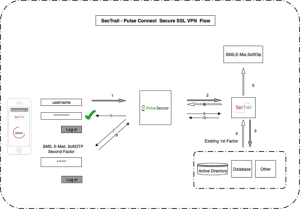
A Real Scenario: Securing Corporate VPN Access
Imagine you are the IT manager of a 500-employee, multi-location company. Your VPN access is open both to office employees and to teams connecting from the field. How would you manage this complexity with a single policy combination?
| Policy Layer | Configuration |
| GeoIP | Allow connections only from operating countries |
| Time Restriction | Business hours: Mon–Fri 08:00–18:00; weekend access disabled |
| IP Whitelist | Prioritize office and data center IP ranges |
| CAPTCHA | Automatically triggered after 3 failed attempts |
| Application Level | Separate policy sets for VPN, CRM, and ERP |
In this configuration, even if an attacker has valid credentials, they are stopped at one of the layers — geographic location, time, or source IP. The depth that standalone MFA cannot provide is the essence of a layered policy architecture.
Not One Rule for Everyone: Granular Control at 4 Levels
A restriction that applies to the accounting department may be impractical for field technical teams. A well-designed access architecture anticipates this and enables policies to be applied at different levels:
- Global Level: A baseline security framework for all applications and users, a fundamental rule set that everyone must follow.
- Application Level: Independent policies for each system such as ERP, CRM, and VPN; additional layers for critical systems and lighter controls for lower-risk tools.
- Group Level: Department-based rules; time restrictions for the finance team, broader access permissions for IT.
- User Level: Individual configurations for highly privileged accounts or temporary situations.
Common Mistakes When Creating Policies
If access policies are configured too strictly, legitimate users are blocked; if configured too loosely, security loses its value. To strike the right balance:
- Do not start strict; start gradually. Establish permissive policies first and tighten them step by step by analyzing blocked access attempts
- Test before going live. Use policy simulation features to verify that real users are not being blocked. Protect administrator accounts. Ensure critical accounts can access under all conditions; a locked administrator account can create a serious operational crisis.
- Protect administrator accounts. Ensure critical accounts can access under all conditions; a locked administrator account can create a serious operational crisis.
- Regularly review access denials. Repeated blocks may be the first sign of previously unnoticed attack patterns.
- Do not rely on a single layer. Geographic location alone is not sufficient; combine time, IP, and user behavior layers.
What Does a System That Asks the Right Questions Do?
If a time-based policy had been active, even if the attacker entered the correct MFA code, the attempt would have been rejected at the very first stage outside business hours — long before reaching the authentication question.
Flexible policy management is not merely a product feature; it is a security philosophy: an approach that evaluates not only who you are, but also where you are, when you connect, and which network you are coming from — in an integrated manner.
For more detailed information about SecTrail MFA’s access controls or to request a demo, you can contact us.